
| 일 | 월 | 화 | 수 | 목 | 금 | 토 |
|---|---|---|---|---|---|---|
| 1 | 2 | 3 | 4 | 5 | 6 | |
| 7 | 8 | 9 | 10 | 11 | 12 | 13 |
| 14 | 15 | 16 | 17 | 18 | 19 | 20 |
| 21 | 22 | 23 | 24 | 25 | 26 | 27 |
| 28 | 29 | 30 |
- 생성형 인공지능
- Python
- ASR
- 자연어처리
- 에이전트
- 정보처리기사
- 객체지향
- 기초
- 알고리즘
- 랭그래프
- 힙정렬
- 머신러닝
- RDBMS
- 트랜스포머
- RNN
- TTS
- python 기초
- UMAP
- LangGraph
- CLIP
- CNN
- SQL
- dementional reduction
- python기초
- 캐글
- Transformer
- 데이터엔지니어
- 데이터 시각화
- 소프트웨어 개발
- 딥러닝
- Today
- Total
수달이네 기술 블로그
10. Iris 데이터셋 예측(머신러닝 입문) 본문
기초 머신러닝 연습 사이클
1. 데이터셋 수집
사이킷런
https://scikit-learn.org/stable/
파이썬으로 작성된 오픈소스 머신러닝 라이브러리
사용처: 데이터 분석, 예측 모델 구축
특징
- 지도학습, 비지도 학습을 모두 지원
- 분류, 회귀, 클러스터링, 차원축소, 모델 선택, 전처리등의 다양한 작업 수행 가능
Iris 데이터셋
사이킷런에서 제공하는 붓꽃의 세가지 품종의 정보를 포함하고 있는 데이터셋
- 꽃받침의 길이, 너비, 꽃잎의 길이, 너비로 이루어진 feature
- 150개의 샘플 데이터
- 다중 클래스 분류 문제 연습에 사용한다.
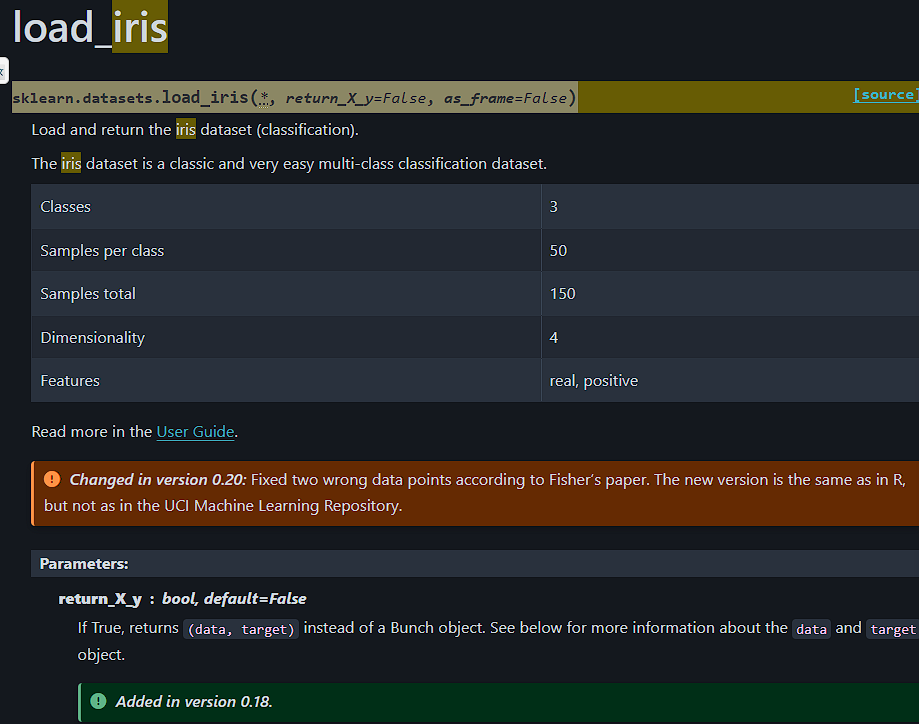
사이킷런 페이지에서 확인할 수 있는 load_iris메서드
- 해당 메서드를 사용하면 iris데이터셋을 불러올 수 있다
Classes: 정답의 종류 개수(꽃의 세가지 품종)
Samples per class: 종류별 개수
Samples total: 총 개수
Dimensionality: 피처 종류 개수
from sklearn.datasets import load_iris

iris = load_iris()
iris

# {'data': array([[5.1, 3.5, 1.4, 0.2],
#         [4.9, 3. , 1.4, 0.2],
#         [4.7, 3.2, 1.3, 0.2],
#         [4.6, 3.1, 1.5, 0.2],
#         [5. , 3.6, 1.4, 0.2],
#         [5.4, 3.9, 1.7, 0.4],
#         [4.6, 3.4, 1.4, 0.3],
#         [5. , 3.4, 1.5, 0.2],
#         [4.4, 2.9, 1.4, 0.2],
#         [4.9, 3.1, 1.5, 0.1],
#         [5.4, 3.7, 1.5, 0.2],
#         [4.8, 3.4, 1.6, 0.2],
#         [4.8, 3. , 1.4, 0.1],
#         [4.3, 3. , 1.1, 0.1],
#         [5.8, 4. , 1.2, 0.2],
#         [5.7, 4.4, 1.5, 0.4],
#         [5.4, 3.9, 1.3, 0.4],
#         [5.1, 3.5, 1.4, 0.3],
#         [5.7, 3.8, 1.7, 0.3],
#         [5.1, 3.8, 1.5, 0.3],
#         [5.4, 3.4, 1.7, 0.2],
#         [5.1, 3.7, 1.5, 0.4],
#         [4.6, 3.6, 1. , 0.2],
#         [5.1, 3.3, 1.7, 0.5],
#         [4.8, 3.4, 1.9, 0.2],
# ...
#   'sepal width (cm)',
#   'petal length (cm)',
#   'petal width (cm)'],
#  'filename': 'iris.csv',
#  'data_module': 'sklearn.datasets.data'}
데이터셋을 불러오면 위와 같은 결과가 출력된다.
from sklearn.datasets import load_iris

iris = load_iris()

print(iris['target'])

# [0 0 0 0 0 0 0 0 0 0 0 0 0 0 0 0 0 0 0 0 0 0 0 0 0 0 0 0 0 0 0 0 0 0 0 0 0
#  0 0 0 0 0 0 0 0 0 0 0 0 0 1 1 1 1 1 1 1 1 1 1 1 1 1 1 1 1 1 1 1 1 1 1 1 1
#  1 1 1 1 1 1 1 1 1 1 1 1 1 1 1 1 1 1 1 1 1 1 1 1 1 1 2 2 2 2 2 2 2 2 2 2 2
#  2 2 2 2 2 2 2 2 2 2 2 2 2 2 2 2 2 2 2 2 2 2 2 2 2 2 2 2 2 2 2 2 2 2 2 2 2
#  2 2]
타겟값 즉, 원래 분류는 위와 같이 0, 1, 2로 3가지로 나열되어있다.
간단하게 설명으로 확인하려면
from sklearn.datasets import load_iris

iris = load_iris()

print(iris['DESCR'])

# .. _iris_dataset:

# Iris plants dataset
# --------------------

# **Data Set Characteristics:**

# :Number of Instances: 150 (50 in each of three classes)
# :Number of Attributes: 4 numeric, predictive attributes and the class
# :Attribute Information:
#     - sepal length in cm
#     - sepal width in cm
#     - petal length in cm
#     - petal width in cm
#     - class:
#             - Iris-Setosa
#             - Iris-Versicolour
#             - Iris-Virginica

# :Summary Statistics:

# ============== ==== ==== ======= ===== ====================
#                 Min  Max   Mean    SD   Class Correlation
# ============== ==== ==== ======= ===== ====================
# sepal length:   4.3  7.9   5.84   0.83    0.7826
# ...
#   - See also: 1988 MLC Proceedings, 54-64.  Cheeseman et al"s AUTOCLASS II
#     conceptual clustering system finds 3 classes in the data.
#   - Many, many more ...
위와 같이 데이터셋의 설명을 자세하게 확인 가능하다.
- sepal length in cm: 꽃받침의 길이
- sepal length in cm: 꽃받침의 너비
- petal length in cm: 꽃잎의 길이
- petal width in cm: 꽃잎의 너비\
- 클래스는 순서대로 0, 1, 2로 표시된다.
data = iris['data']
data.shape

# (150, 4)
데이터 컬럼을 이용하면, 해당 데이터셋의 데이터만 불러올 수 있고, 그 데이터셋으로 shape를 통해 차원을 확인할 수 있다.
feature_names = iris['feature_names']
feature_names

# ['sepal length (cm)',
#  'sepal width (cm)',
#  'petal length (cm)',
#  'petal width (cm)']
feature_names를 통해 피처의 이름만을 확인할 수 있다.
import pandas as pd

df_iris = pd.DataFrame(data, columns=feature_names)
df_iris| sepal length (cm) | sepal width (cm) | petal length (cm) | petal width (cm) | |
| 0 | 5.1 | 3.5 | 1.4 | 0.2 |
| 1 | 4.9 | 3.0 | 1.4 | 0.2 |
| 2 | 4.7 | 3.2 | 1.3 | 0.2 |
| 3 | 4.6 | 3.1 | 1.5 | 0.2 |
| 4 | 5.0 | 3.6 | 1.4 | 0.2 |
| ... | ... | ... | ... | ... |
| 145 | 6.7 | 3.0 | 5.2 | 2.3 |
| 146 | 6.3 | 2.5 | 5.0 | 1.9 |
| 147 | 6.5 | 3.0 | 5.2 | 2.0 |
| 148 | 6.2 | 3.4 | 5.4 | 2.3 |
| 149 | 5.9 | 3.0 | 5.1 | 1.8 |
위에서 만든 데이터, feature_name을 통해 데이터 프레임으로 만들어 줄 수 있다.
그러나 위 데이터셋엔 타겟 데이터가 존재하지 않는다. 이걸 해결하면
import pandas as pd

df_iris = pd.DataFrame(data, columns=feature_names)
df_iris['target'] = target
df_iris
| sepal length (cm) | sepal width (cm) | petal length (cm) | petal width (cm) | target | |
| 0 | 5.1 | 3.5 | 1.4 | 0.2 | 0 |
| 1 | 4.9 | 3.0 | 1.4 | 0.2 | 0 |
| 2 | 4.7 | 3.2 | 1.3 | 0.2 | 0 |
| 3 | 4.6 | 3.1 | 1.5 | 0.2 | 0 |
| 4 | 5.0 | 3.6 | 1.4 | 0.2 | 0 |
| ... | ... | ... | ... | ... | ... |
| 145 | 6.7 | 3.0 | 5.2 | 2.3 | 2 |
| 146 | 6.3 | 2.5 | 5.0 | 1.9 | 2 |
| 147 | 6.5 | 3.0 | 5.2 | 2.0 | 2 |
| 148 | 6.2 | 3.4 | 5.4 | 2.3 | 2 |
| 149 | 5.9 | 3.0 | 5.1 | 1.8 | 2 |
독립변수:위에서 타겟을 제외한 학습을 위한 데이터(입력 데이터)
종속변수: 타겟값(출력 데이터)
2.데이터셋 분할
일부 데이터는 학습용(train), 일부 데이터는 검증용(valid), 일부 데이터는 테스트 용(test)으로 만든다.
우리는 데이터 셋을 8대 2의 비율로 나눠볼 것이다.
그러나 위같은 데이터를 아래부분을 그냥 30개를 떼어낸다면, 타겟값은 2만 나와 사실상 제대로된 학습이 불가할 것이다. 그렇기 때문에, 데이터셋을 섞어준다.
일단은 train 과 test로만 나눠줄 것이다.(연습할때는 train, test로만 나누는 경우가 많다)
사이킷런의 데이터 분할 함수
from sklearn.model_selection import train_test_split

X_train, X_test, ytrain, ytest = train_test_split(df_iris.drop('target', axis=1), df_iris['target'], test_size=0.2, random_state=42)
매개변수
- 독립변수:df_iris.drop('target', axis=1) 데이터 프레임에서 타겟값만 드롭시킨다
- 종속변수: df_iris['target'] 타겟값
- 테스트 값의 비율: test_size=0.2 20%를 테스트 데이터로 만듦
- 난수 시드: random_state=42 난수를 만들때 사용하는 값 42
- 데이터가 섞였는데 우연히 정답이 한쪽으로 쏠려서 잘 못 맞출 가능성이 존재한다.
- 그런데 그걸 확인하려면 데이터가 일관되게 섞여 있어야한다. 그래야 제대로 된 연구가 가능하다.
- 왜 난수시드를 사용해?
리턴값
- X_train: 모델이 학습할 데이터를 가진 것 중 독립변수(train의 독립변수)
- X_test: 모델이 학습한 후 잘 맞추는지 확인할 독립변수(test의 독립변수)
- y_train: 모델이 학습할 데이터를 가진 것 중 종속변수(train의 종속변수)
- y_test: 모델이 학습한 후 잘 맞추는지 확인할 종속변수(test의 종속변수)
왜 X는 대문자고 y는 소문자일까?
- 정확히는 차원을 구분하기 위함이다.
- X로 되어있는 독립변수들은 행렬,데이터프레임(컬럼과 값이 여러개)]
- y로 되어있는 종속변수들은 벡터,시리즈(컬럼이 한개)
- 로 구성되어있다. 관례적으로 행렬같이 2차원 이상으로 구성된 값은 앞글자를 대문자로,
- 벡터나 단일값같이 1차원인 값은 앞글자를 소문자로 구성한다.
| X_train | sepal length (cm) | sepal width (cm) | petal length (cm) | petal width (cm) |
| 22 | 4.6 | 3.6 | 1.0 | 0.2 |
| 15 | 5.7 | 4.4 | 1.5 | 0.4 |
| 65 | 6.7 | 3.1 | 4.4 | 1.4 |
| 11 | 4.8 | 3.4 | 1.6 | 0.2 |
| 42 | 4.4 | 3.2 | 1.3 | 0.2 |
| ... | ... | ... | ... | ... |
| 71 | 6.1 | 2.8 | 4.0 | 1.3 |
| 106 | 4.9 | 2.5 | 4.5 | 1.7 |
| 14 | 5.8 | 4.0 | 1.2 | 0.2 |
| 92 | 5.8 | 2.6 | 4.0 | 1.2 |
| 102 | 7.1 | 3.0 | 5.9 | 2.1 |
| X_test | sepal length (cm) | sepal width (cm) | petal length (cm) | petal width (cm) |
| 73 | 6.1 | 2.8 | 4.7 | 1.2 |
| 18 | 5.7 | 3.8 | 1.7 | 0.3 |
| 118 | 7.7 | 2.6 | 6.9 | 2.3 |
| 78 | 6.0 | 2.9 | 4.5 | 1.5 |
| 76 | 6.8 | 2.8 | 4.8 | 1.4 |
| ... | ... | ... | ... | ... |
| 64 | 5.6 | 2.9 | 3.6 | 1.3 |
| 141 | 6.9 | 3.1 | 5.1 | 2.3 |
| 68 | 6.2 | 2.2 | 4.5 | 1.5 |
| 82 | 5.8 | 2.7 | 3.9 | 1.2 |
| 110 | 6.5 | 3.2 | 5.1 | 2.0 |
| 12 | 4.8 | 3.0 | 1.4 | 0.1 |
| y_train | target |
| 22 | 0 |
| 15 | 0 |
| 65 | 1 |
| 11 | 0 |
| … | … |
| y_test | target |
| 73 | 1 |
| 18 | 0 |
| 118 | 2 |
| 78 | 1 |
| … | … |
3.데이터셋 확인
import matplotlib.pyplot as plt

fig, axes = plt.subplots(1, 2, figsize=(10, 4))

y_train.value_counts().sort_index().plot(
    kind='bar', ax=axes[0], title='y_train (No Stratify)'
)

y_test.value_counts().sort_index().plot(
    kind='bar', ax=axes[1], title='y_test (No Stratify)'
)
matplotlib으로 데이터셋을 확인한다.

나눠진 데이터셋을 비교해보면 상대적으로 균등하게 나눠진 것을 확인할 수 있다.
- 그러나 만약 균등하게 나눠지지 않았을 경우가 있을 수 있는데
from sklearn.model_selection import train_test_split

X_train, X_test, y_train, y_test = train_test_split(
		 df_iris.drop('target', axis=1), df_iris['target'],
		 test_size=0.2, random_state=42, stratify = df_iris['target']
)
위처럼 stratify옵션을 활성화 시켜줄 경우에
import matplotlib.pyplot as plt

fig, axes = plt.subplots(1, 2, figsize=(10, 4))

y_train.value_counts().sort_index().plot(
    kind='bar', ax=axes[0], title='y_train (Stratify)'
)

y_test.value_counts().sort_index().plot(
    kind='bar', ax=axes[1], title='y_test (Stratify)'
)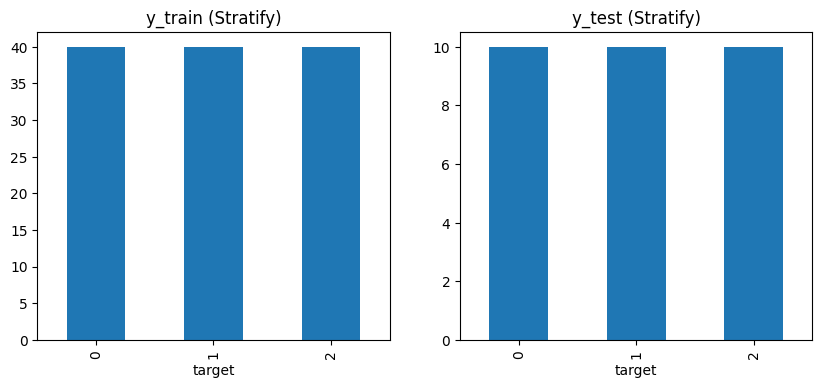
위처럼 균등하게 값이 분할되는 것을 확인할 수 있다.
4. SVC모델 사용
SVC모델이란?
서포트 벡터 머신: 두 개 이상의 클래스를 구분하는 지도학습 알고리즘
- 분류문제에 주로 사용되며 일부 회귀문제에도 사용.
원리
- 두 클래스 간의 경계를 가장 잘 구분하는 최적의 초평면(Hyperplane)을 찾음
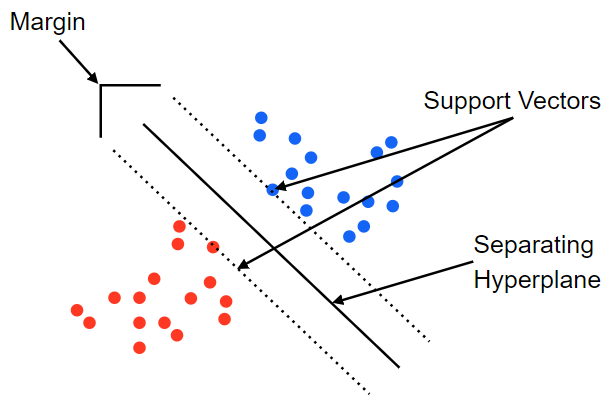
위의 점들이 데이터셋, 실선이 초평면, 점선이 서포트 벡터이다.
- 1번 클래스, 2번 클래스에서 가장 가까운 값을 찾음.(support vector)
- 해당 값들이 가장 멀게 만들어주는 선을 그어줌(hyperplane)
from sklearn.svm import SVC

svc = SVC()
svc.fit(X_train, y_train)
y_pred = svc.predict(X_test)
y_pred

# array([0, 2, 1, 1, 0, 1, 0, 0, 2, 1, 2, 2, 2, 1, 0, 0, 0, 1, 1, 2, 0, 2,
#        1, 2, 2, 2, 1, 0, 2, 0])
svc.fit(X_train, y_train): train 데이터를 이용하여 svc모델로 학습한다.
y_pred =svc.predict(X_test): test데이터셋을 학습한 모델을 통해 예측한다
이제 나온 값과 진짜 값을 비교하면 된다.
from sklearn.metrics import accuracy_score
accuracy = accuracy_score(y_test, y_pred)
accuracy  # 1.0

# 0.9666666666666667
하나하나 비교해도 괜찮지만, 직접 비교하는 방식을 사용한다면 위와 같다.
- accuracy = accuracy_score(y_test, y_pred): test값과 pred값을 비교해 정답률을 산정한다(1.0은 다맞춤)
Reference
사이킷런
1. 사이킷런사이킷런(scikit-learn)은 파이썬(Python)으로 작성된 오픈소스 머신러닝 라이브러리로, 데이터 분석과 예측 모델 구축을 위해 널리 사용됩니다. 간단하고 일관된 인터페이스를 제공하며,
ryuzyproject.tistory.com
'AI공부 > 머신러닝' 카테고리의 다른 글
| 12. 주택 임대료 예측 2 (0) | 2025.12.30 |
|---|---|
| 11. 주택 임대료 예측 (1) | 2025.12.29 |
| 8. 머신러닝 기초 (1) | 2025.12.10 |
| 7.셀레니움을 이용한 크롤링3: 데이터프레임화(야놀자 리뷰 크롤링) (1) | 2025.12.01 |
| 6. 셀레니움을 이용한 크롤링 2: 이미지 (0) | 2025.12.01 |