
| 일 | 월 | 화 | 수 | 목 | 금 | 토 |
|---|---|---|---|---|---|---|
| 1 | 2 | 3 | 4 | 5 | 6 | |
| 7 | 8 | 9 | 10 | 11 | 12 | 13 |
| 14 | 15 | 16 | 17 | 18 | 19 | 20 |
| 21 | 22 | 23 | 24 | 25 | 26 | 27 |
| 28 | 29 | 30 |
- python기초
- 트랜스포머
- LangGraph
- SQL
- 기초
- RDBMS
- 머신러닝
- 힙정렬
- 객체지향
- ASR
- 정보처리기사
- CNN
- 소프트웨어 개발
- 알고리즘
- 에이전트
- 딥러닝
- UMAP
- 자연어처리
- 생성형 인공지능
- Transformer
- CLIP
- python 기초
- 캐글
- 데이터 시각화
- 데이터엔지니어
- 랭그래프
- RNN
- dementional reduction
- TTS
- Python
- Today
- Total
수달이네 기술 블로그
16. 호텔 예약 수요 데이터셋 1(EDA, 인코딩) 본문
호텔 예약에 대한 수요 패턴 분석 데이터셋
https://www.kaggle.com/datasets/jessemostipak/hotel-booking-demand/data
- 위 캐글 데이터셋을 다운받아 분석할 것이다.
https://ryuzyproject.tistory.com/73
- 위 블로그 글을 참조했다.
import pandas as pd

hotel_df = pd.read_csv('.\\house\\data\\hotel_bookings.csv')
hotel_df
| hotel | is_canceled | lead_time | arrival_date_year | arrival_date_month | |
| 0 | Resort Hotel | 0 | 342 | 2015 | July |
| 1 | Resort Hotel | 0 | 737 | 2015 | July |
| 2 | Resort Hotel | 0 | 7 | 2015 | July |
| 3 | Resort Hotel | 0 | 13 | 2015 | July |
| ... | Resort Hotel | 0 | 14 | 2015 | ... |
- hotel: 호텔 유형 (Resort Hotel, City Hotel)
- is_canceled: 예약 취소 여부 (0: 예약 유지, 1: 예약 취소)
- lead_time: 예약과 실제 체크인 사이의 기간(일 단위)
- arrival_date_year: 도착 연도
- arrival_date_month: 도착 월
- arrival_date_week_number: 해당 연도의 주
- arrival_date_day_of_month: 도착 일
- stays_in_weekend_nights: 주말(토, 일) 동안의 숙박일 수
- stays_in_week_nights: 주중(월~금) 동안의 숙박일 수
- adults: 성인 투숙객 수
- children: 어린이 투숙객 수
- babies: 유아 투숙객 수
- meal: 예약된 식사 유형
- country: 고객의 국가
- market_segment: 예약 시장 세그먼트
- distribution_channel: 예약 채널 (예: 온라인, 오프라인)
- is_repeated_guest: 재방문 여부
- previous_cancellations: 이전 예약 취소 횟수
- reserved_room_type: 예약된 객실 유형
- assigned_room_type: 실제 배정된 객실 유형
- booking_changes: 예약 변경 횟수
- deposit_type: 보증금 유형 (No Deposit, Non Refund, Refundable)
- days_in_waiting_list: 대기자 명단에 있었던 일 수
- customer_type: 고객 유형 (예: Transient, Group)
- adr: 평균 일일 요금 (유로)
- required_car_parking_spaces: 주차 공간 요구 수
- total_of_special_requests: 특별 요청 수
- reservation_status: 예약 상태 (Check-Out, Canceled, No-Show)
- reservation_status_date: 예약 상태가 마지막으로 업데이트된 날짜
이번에 할 것은 is_canceled 즉, 예약을 유지할지 아니면 예약을 취소할지를 예측하는 분류문제를 진행할 것이다.
EDA(데이터 전처리)
hotel_df .describe()describe함수를 이용하여 데이터의 이상치를 확인해본다.
- lead_time즉, 예약하고부터 입장하는 시간의 길이를 보니, max가 737즉, 2년의 시간이 걸리는 것이 보이는데, 이상치일 가능성이 존재한다.
- adult 즉, 어른의 수가 0인 값들이 존재하는데, 호텔 예약 수요인데 어른없이 예약은 불가능 하다. 0일 가능성이 있을까 이것도 확인할 필요가 있다.
lead_time
sns.displot(hotel_df['lead_time'], kde=True)
- 500이상의 값들은 매우 적은 양임을 알 수 있다.
sns.boxplot(x=hotel_df['lead_time'])

- boxplot으로 볼때 700의 값이 튀어나온게 2개 보인다.
- 그러나 이상치가 아닐수도 있다. (오류가 아닌 실제 저렇게 투숙하는 사람)
Q1 = hotel_df['lead_time'].quantile(0.25) #이상치 기준 1사분위수
Q3 = hotel_df['lead_time'].quantile(0.75) #이상치 기준 3사분위수
IQR = Q3 - Q1 #IQR 계산
lower_bound = Q1 - 1.5 * IQR #하한선
upper_bound = Q3 + 1.5 * IQR #상한선
print(f'Lower Bound: {lower_bound}, Upper Bound: {upper_bound}')

#Lower Bound: -195.0, Upper Bound: 373.0
- Q1과 Q3를 구해서 IQR을 직접 구해준다.
- IQR을 구하여 그 이상의 값을 제거하는 방식으로 이상치를 없앨 수도 있따.
- lower_bound의 경우 -가 출력되었는데 이는 0으로 치는 것이 더 편하다.
- upper_bound의 경우 373즉 위 boxplot에서 나타난 선인데 그 위로 이상치라고 치고 제거해줄 수도 있다.
hotel_df = hotel_df[(hotel_df['lead_time'] >= lower_bound) & (hotel_df['lead_time'] <= upper_bound)]
이렇게 이상치를 제거하여 준다면
- 위와 같이 boxplot의 Q3가 350대로 줄어든 것을 볼 수 있다. 눈에 띄는 이상치는 보이지 않으므로 이렇게 진행할 수 있다.
- 그러나 이상치를 제거하지 않고 코드를 진행해볼 것이다.
distribution_channel
sns.barplot(x = hotel_df['distribution_channel'], y = hotel_df['is_canceled'])
distribution channel즉, 예약 방식을 취소한 것과 비교하여 본다면
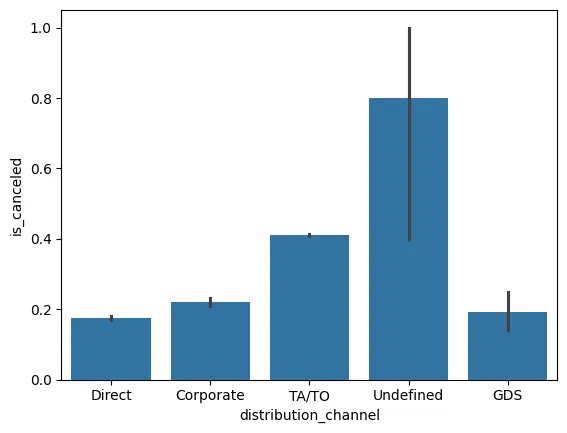
위와 같이 확인된다.
- 그러나 undefined의 취소율이 높긴 한데 확실하지 않다. 왜 그런지 살펴보면
hotel_df['distribution_channel'].value_counts()

# distribution_channel
# TA/TO        97870
# Direct       14645
# Corporate     6677
# GDS            193
# Undefined        5
# Name: count, dtype: int64- 위와 같이 value_count가 5, 즉 표본이 매우 적기 때문에 신뢰 구간이 넓게 나타난다.
- direct : 직접
- corporate: 회사가 예약
- ta/to: 여행사가 예약
- gds: 호텔 예약 사이트
- 어느 정도 종속 변수와 영향이 있는 듯 보인다.
hotel
sns.barplot(x = hotel_df['hotel'], y = hotel_df['is_canceled'])
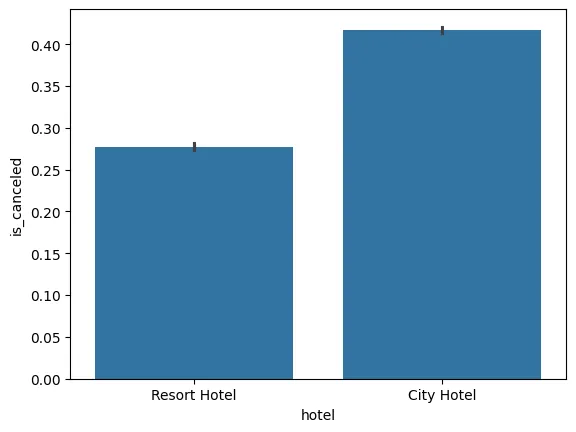
- city hotel이 전반적으로 더 취소하는 비율이 높아보인다.
arrival_date_month
import calendar

months = []# 월 이름 리스트 생성
for i in range(1,13):# 1~12월까지 반복
    months.append(calendar.month_name[i])# 월 이름 추가

plt.figure(figsize=(15,6))
sns.barplot(x = hotel_df['arrival_date_month'], y = hotel_df['is_canceled'], order=months)# 월 이름 순서대로 정렬
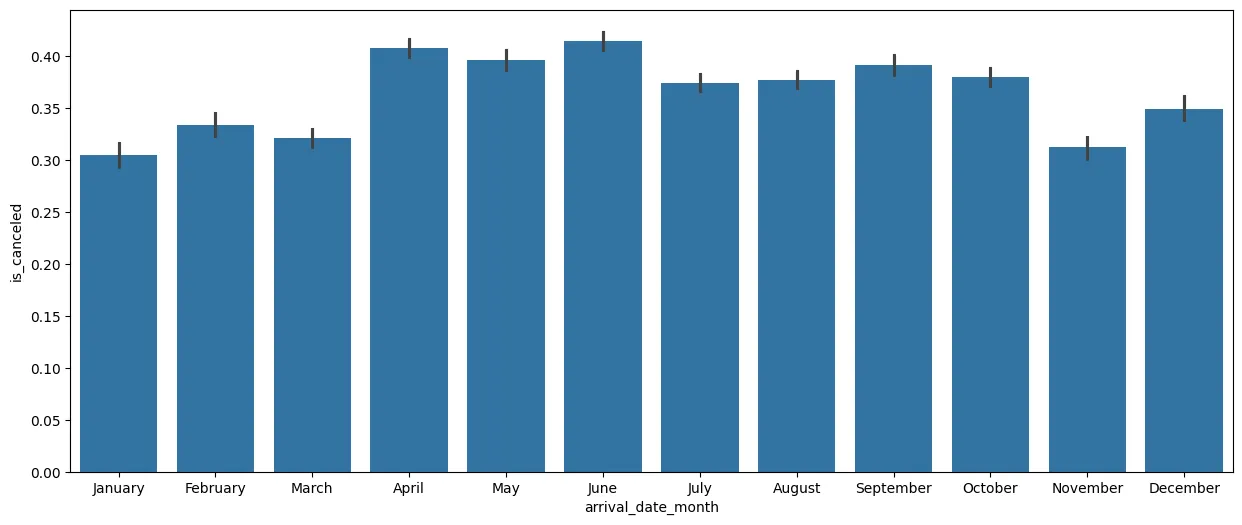
- 월별로 정리하니 날씨가 추울때는 취소율이 더 낮아보이는 순서관계를 확인할 수 있다.
NULL값 제거
hotel_df.isna().sum()

# hotel                                  0
# is_canceled                            0
# lead_time                              0
# arrival_date_year                      0
# arrival_date_month                     0
# arrival_date_week_number               0
# arrival_date_day_of_month              0
# stays_in_weekend_nights                0
# stays_in_week_nights                   0
# adults                                 0
# children                               4
# babies                                 0
# meal                                   0
# country                              488
# market_segment                         0
# distribution_channel                   0
# is_repeated_guest                      0
# previous_cancellations                 0
# previous_bookings_not_canceled         0
# reserved_room_type                     0
# assigned_room_type                     0
# booking_changes                        0
# deposit_type                           0
# agent                              16340
# company                           112593
# days_in_waiting_list                   0
# customer_type                          0
# adr                                    0
# required_car_parking_spaces            0
# total_of_special_requests              0
# reservation_status                     0
# reservation_status_date                0
# dtype: int64- NULL값이 있는 것을 확인해본다.
그리고 null값을 어떻게 처리할지 확인하기 위해 value_count를 이용해 값의 분포를 확인한다.
country
- Country의 경우 지역사람에 따라서 삭제하고 안하고가 정해지는 것은 희박할 것이라 생각,(지역감정?)
- 따라서 아예 해당 컬럼을 삭제해준다.
hotel_df.drop(['country'], axis=1, inplace=True)agent
- 해당 컬럼은 agent의 코드번호로 보인다.
hotel_df['agent'].value_counts(dropna=False).sort_index()

# agent
# 1.0       7187
# 2.0        162
# 3.0       1336
# 4.0         47
# 5.0        330
#          ...
# 526.0       10
# 527.0       35
# 531.0       68
# 535.0        3
# NaN      16280
# Name: count, Length: 334, dtype: int64- 이건 어떤 영향이 있을지 확실치 않으니 제거하진 말고, -1로 NaN을 바꿔준다.
hotel_df['agent'].fillna(-1, inplace=True)
hotel_df['agent'].value_counts(dropna=False).sort_index()

# agent
# -1.0      16280
#  1.0       7187
#  2.0        162
#  3.0       1336
#  4.0         47
#           ...
#  510.0        2
#  526.0       10
#  527.0       35
#  531.0       68
#  535.0        3
# Name: count, Length: 334, dtype: int64- 이제 해당 값을 series로 저장해준다
agent_freq = hotel_df['agent'].value_counts() # 각 에이전트별 빈도수 계산
hotel_df['agent_freq'] = hotel_df['agent'].map(agent_freq) # 빈도수 매핑- 이걸로 agent를 빈도수별로 따로 매핑한 컬럼을 생성해준다.
- 이 이유는 어차피 해당 컬럼의 내용이 어떤 내용인지 모델은 모른다.(의미도 없다) 따라서 그냥 빈도수로 나타내서 직관적으로 보이게 한다.
hotel_df.drop(['agent'], axis=1, inplace=True)
- agent는 삭제시켜준다
company
해당 컬럼은 대부분이 NaN값이다.
- -1로 채워주고, 위에서 했든 freq를 만들어 넣어줄 것이다.
hotel_df['company'] = hotel_df['company'].fillna(-1)

hotel_df['company'].value_counts(dropna=False).sort_index()

# company
# -1.0      112442
#  6.0           1
#  8.0           1
#  9.0          37
#  10.0          1
#            ...
#  531.0         1
#  534.0         2
#  539.0         2
#  541.0         1
#  543.0         2
# Name: count, Length: 349, dtype: int64
company_freq = hotel_df['company'].value_counts(dropna=False)
hotel_df['company_freq'] = hotel_df['company'].map(company_freq)
hotel_df.drop(['company'], axis=1, inplace=True)
children
hotel_df['children'].value_counts(dropna=False)

# children
# 0.0     110796
# 1.0       4861
# 2.0       3652
# 3.0         76
# NaN          4
# 10.0         1
# Name: count, dtype: int64
- children의 경우 NaN의 값이 4개분이고, 없을경우 0.0으로 표시되므로 NaN값을 0으로 만들어 주는게 좋아보인다.
hotel_df['children'].fillna(0, inplace=True)

hotel_df['children'].value_counts(dropna=False)

# children
# 0.0     110800
# 1.0       4861
# 2.0       3652
# 3.0         76
# 10.0         1
# Name: count, dtype: int64
- 0으로 바꿔주었다.
adults
- adults의 경우 위에서 말했듯 0인게 말이 안된다. 그러나 가능하다고 판단하고 진행한다.
- 그러나 위와 같이 진행한다면 굳이 adult와 children, baby 등을 나눌 필요가 없어 보인다.
- 따라서 이것들을 그냥 합쳐서 people이라는 변수를 새로 만들어 줄것이다.
hotel_df['people'] = hotel_df['adults'] + hotel_df['children'] + hotel_df['babies']
hotel_df.drop(['adults', 'children', 'babies'], axis=1, inplace=True)
people
people변수를 만들어 주었는데, 해당 변수의 값이 0이라면, 이건 이상치이다. (호텔을 예약했는데 숙박한 인원이 없다는 게 문제.)
hotel_df['people'].value_counts()

# people
# 2.0     82051
# 1.0     22581
# 3.0     10495
# 4.0      3929
# 0.0       180
# 5.0       137
# 26.0        5
# 10.0        2
# 12.0        2
# 20.0        2
# 27.0        2
# 40.0        1
# 50.0        1
# 55.0        1
# 6.0         1
# Name: count, dtype: int64
- 0.0이 180이나 된다.
- 이걸 drop해준다.
hotel_df = hotel_df[hotel_df['people'] != 0]

hotel_df['people'].value_counts()
# people
# 2.0     82051
# 1.0     22581
# 3.0     10495
# 4.0      3929
# 5.0       137
# 26.0        5
# 12.0        2
# 27.0        2
# 10.0        2
# 20.0        2
# 50.0        1
# 40.0        1
# 55.0        1
# 6.0         1
# Name: count, dtype: int64
이러면 NaN값은 모두 제거해주었다.
total_nights
새로운 파생 변수를 만드는데, 전체적으로 묵는 밤의 수를 계산하는 변수이다.
hotel_df['total_nights'] = hotel_df['stays_in_weekend_nights'] + hotel_df['stays_in_week_nights']
hotel_df.drop(['stays_in_weekend_nights', 'stays_in_week_nights'], axis=1, inplace=True)
drop해주는 이유는 전체적으로 컬럼수가 너무 많으면 모델이 학습하기 어렵고, 잘못학습할 수 있기 때문이다.
arrival_date_month > season
아까 위에서 확인한 바로 arrival_date_month 변수 자체의 값이 상세하게 cancel에 영향을 주는게 아니라, 일정 구역에 따라 영향이 가는 것을 확인했다.
- 따라서 이걸 season으로 4구역으로 묶어주면 변수 개수도 훨씬 줄어들것같다.
season_dic = {'spring': [3,4,5], 'summer': [6,7,8], 'autumn': [9,10,11], 'winter': [12,1,2]}
new_season_dic = {}

for i in season_dic:
    for j in season_dic[i]:
        new_season_dic[calendar.month_name[j]] = i

new_season_dic

# {'March': 'spring',
#  'April': 'spring',
#  'May': 'spring',
#  'June': 'summer',
#  'July': 'summer',
#  'August': 'summer',
#  'September': 'autumn',
#  'October': 'autumn',
#  'November': 'autumn',
#  'December': 'winter',
#  'January': 'winter',
#  'February': 'winter'}
- dictionary와 calender를 이용하여 월과 계절을 연결해준다.
hotel_df['season'] = hotel_df['arrival_date_month'].map(new_season_dic)
- 그리고 map 함수를 통해 arrival_date_month에서 키를 찾아 값을 반환해주어 season변수를 완성한다.
hotel_df['season'].value_counts()
# season
# summer    37434
# spring    32626
# autumn    28418
# winter    20732
# Name: count, dtype: int64
hotel_df.drop(['arrival_date_month'], axis=1, inplace=True)
- 이후 drop해준다.
room_type
13 reserved_room_type 119210 non-null object 14 assigned_room_type 119210 non-null object
위 두 변수를 하나로, 즉 원래 예약했던 room_type 업그레이드 되었나(변했나)를 확인해본다.
hotel_df['expected_room_type'] = (hotel_df['reserved_room_type'] == hotel_df['assigned_room_type']).astype(int)
hotel_df.drop(['reserved_room_type', 'assigned_room_type'], axis=1, inplace=True)
cancel_rate
이전에 cancel한 횟수와 cancel하지 않은 횟수를 나타내는
11 previous_cancellations 119210 non-null int64
12 previous_bookings_not_canceled 119210 non-null int64
위 두 변수를 하나로 만들어 cancel_rate로 만들어줄 것이다.
hotel_df['cancel_rate'] = hotel_df['previous_cancellations'] / (hotel_df['previous_cancellations'] + hotel_df['previous_bookings_not_canceled'])
hotel_df['cancel_rate'].value_counts(dropna=False)

# cancel_rate
# NaN         109762
# 1.000000      5835
# 0.000000      2969
# 0.500000        66
# 0.250000        47
#              ...
# 0.375000         1
# 0.227273         1
# 0.217391         1
# 0.208333         1
# 0.192308         1
# Name: count, Length: 112, dtype: int64
위와 같이 취소율을 구해준다. 그런데 NaN즉, 이전에 안 온 사람들 때문에 NaN값이 만들어진다.
- (NaN을 나눠주면 NaN반환)
이걸따로 표시해주기 위해서 -1로 채워줘보자
hotel_df['cancel_rate'] = hotel_df['cancel_rate'].fillna(-1)
hotel_df.drop(['previous_cancellations', 'previous_bookings_not_canceled'], axis=1, inplace=True)
- 그리고 필요 없는 것을 삭제해줌
컬럼 삭제
필요 없는 컬럼을 찾아보자
- number컬럼이 아닌 컬럼들 중에 원핫 인코딩을 했을때 문제가 될만한 것을 확인해보자
for i in hotel_df.select_dtypes(exclude = ['number']).columns.tolist():
    print(f'{i}: {hotel_df[i].nunique()}')

# hotel: 2
# meal: 5
# market_segment: 8
# distribution_channel: 5
# deposit_type: 3
# customer_type: 4
# reservation_status: 3
# reservation_status_date: 926
# season: 4
- reservation_status_date가 유난히 많은데,
- 해당 값은 예약 업데이트 날짜 일뿐이므로 제거해줘도 괜찮을 것 같다.
- meal의 경우 이것 때문에 호텔 예약이 정해지고 안정해지고가 나눠질 것 같진않으므로 제거해도 상관없을것 같다.
hotel_df.drop(['reservation_status_date', 'meal'], axis=1, inplace=True)
원핫 인코딩
hotel_df = pd.get_dummies(hotel_df, columns = hotel_df.select_dtypes(exclude = ['number']).columns.tolist(), drop_first=True)
- 숫자 컬럼을 제외하고 원핫인코딩을 해준다.
'AI공부 > 머신러닝' 카테고리의 다른 글
| 18. K-Fold 교차검증 (0) | 2026.01.12 |
|---|---|
| 17. 호텔 수요 예측 2(모델 학습, 스케일링, 예측) (1) | 2026.01.11 |
| 15. 서울 따릉이 수요 예측2 (0) | 2026.01.09 |
| 14. 서울 따릉이 대여 수요 예측 (0) | 2026.01.06 |
| 13. 자전거 대여 수요 예측 (0) | 2026.01.02 |