
| 일 | 월 | 화 | 수 | 목 | 금 | 토 |
|---|---|---|---|---|---|---|
| 1 | 2 | 3 | 4 | 5 | 6 | |
| 7 | 8 | 9 | 10 | 11 | 12 | 13 |
| 14 | 15 | 16 | 17 | 18 | 19 | 20 |
| 21 | 22 | 23 | 24 | 25 | 26 | 27 |
| 28 | 29 | 30 |
- python 기초
- 소프트웨어 개발
- 자연어처리
- Transformer
- 객체지향
- 트랜스포머
- TTS
- 캐글
- ASR
- RDBMS
- Python
- dementional reduction
- 기초
- 힙정렬
- SQL
- 데이터 시각화
- 알고리즘
- CLIP
- UMAP
- 정보처리기사
- CNN
- 생성형 인공지능
- 딥러닝
- 에이전트
- 머신러닝
- 데이터엔지니어
- RNN
- 랭그래프
- LangGraph
- python기초
- Today
- Total
수달이네 기술 블로그
0. 텐서플로우 본문
텐서플로우(Tensor Flow)
오픈소스 머신러닝 라이브러리, 수치 계산, 딥러닝 모델 구축을 위한 기능 제공.
- 데이터 흐름 그래프(Data Flow Graph)기반으로 작동
- 실행전에 전체를 정의하여 구조가 고정되고 유연성이 낮다.
- 하지만 빠르므로 대규모 신경망 학습과 추론에 적합하다.
- 파이토치는 동적 계산 그래프 기반으로 코드 실행 시점에 실시간으로 계산 흐름이 결정되어 디버깅, 수정이 쉬움 (이전 파이토치 프레임워크 입문 글 확인)
- Node = 연산, Edge = 텐서를 나타냄
- 파이썬을 주로 사용하며, 직관적인 API인 Keras(파이토치의 nn)를 포함해 모델을 쉽고 빠르게 구축할 수 있다.
- CPU, GPU, TPU(AI를 위한 하드웨어)등 다양한 환경에서 사용 가능
Tensor?
TensorFlow상에서 텐서는 다차원 배열을 표현하는 핵심 데이터 구조
- NumPy배열과 매우 유사하나,
- 추가적으로 딥러닝 모델 학습에 필수적인 자동 미분 기능 지원.
- 이를 통해 역전파를 자동 처리 가능
Shape(모양): 텐서가 가지는 차원의 크기 ex. (3,4) = 3행 4열의 2차원 텐서
data type(자료형): 텐서에 저장되는 데이터 타입(float32, int 32 등)
device(저장된 장치): 텐서가 현재 저장되어 있는 곳
- 파이토치의 Tensor와 동일
import tensorflow as tf

data = [
    [1,2],
    [3,4]
]
x = tf.constant(data)
print(x)

# tf.Tensor(
# [[1 2]
# [3 4]], shape=(2, 2), dtype=int32)- 위와 같이 구성된다.
print(tf.rank(x))

# tf.Tensor(2, shape=(), dtype=int32)- tf.rank(): tensorflow의 차원을 출력해 줄 수 있다.
data = tf.constant("String")
print(data)

# tf.Tensor(b'String', shape=(), dtype=string)- 파이토치 프레임워크의 tensor와 다르게 문자를 저장할 수 있지만 거의 사용하지 않는다.
a = tf.constant([5])
b = tf.constant([6])

c = (a + b).numpy()
print(c)
print(type(c))
# [11]
# <class 'numpy.ndarray'>- numpy배열로 변환해 줄 수 있다.
result = c * 10
tensor = tf.convert_to_tensor(result)
print(tensor)
print(type(tensor))
# tf.Tensor([110], shape=(1,), dtype=int32)
# <class 'tensorflow.python.framework.ops.EagerTensor'>- 해당 numpy배열을 다시 tensor로 변환해 줄 수 있다.
- 그냥 Tensor가 아닌 EagerTensor는 뭘까?
참고) EagerTensor란?
텐서플로우에서 연산이 즉시 실행되는 Eager Execution모드에서 생성되는 텐서.
기존 1.x버전의 텐서플로우에선 연산을 그래프로 정의한 후 Session으로 실행
2.x버전부터는 즉시 실행(Eager Execution)이 기본값으로 활성화되어 Python 코드처럼 한줄한줄 계산결과를 확인 가능
x = tf.constant([
    [5,7],
    [1,0]
])

x_ones = tf.ones_like(x)
print(x_ones)

# tf.Tensor(
# [[1 1]
# [1 1]], shape=(2, 2), dtype=int32)- ones_like메서드를 이용하여 tensor의 모양만을 가져올 수 있다.
x_rand = tf.random.uniform(shape=x.shape, dtype = tf.float32)
print(x_rand)

# tf.Tensor(
# [[0.4182371  0.30073655]
#  [0.8847904  0.5320504 ]], shape=(2, 2), dtype=float32)
x_rand = tf.random.uniform(shape=x.shape, dtype = tf.int32, maxval=32)
print(x_rand)
# tf.Tensor(
# [[14 9]
# [27 10]], shape=(2, 2), dtype=int32)- random은 실수, 정수 값을 랜덤으로 넣어줄 수 있다.
- 정수는 maxval을 통해 최대값을 지정해야 함.
Tensor의 형변환, 차원 조작
기초적인 인덱싱은 동일하게 가능하다.
tensor = tf.constant([
    [1,2,3,4],
    [2,4,5,6],
    [6,5,4,3]
])

print(tensor[0])
# tf.Tensor([1 2 3 4], shape=(4,), dtype=int32)
print(tensor[:, 0])     # ':'을 통해 행에 대해서 다 가져옴
# tf.Tensor([1 2 6], shape=(3,), dtype=int32)
print(tensor[..., -1])  # '...'을 통해 앞의 모든 원소를 다 가져옴
# tf.Tensor([4 6 3], shape=(3,), dtype=int32)
텐서를 연결해 줄 수 있다.
result = tf.concat([tensor, tensor, tensor], axis = 0)
print(result)

# tf.Tensor(
# [[1 2 3 4]
#  [2 4 5 6]
#  [6 5 4 3]
#  [1 2 3 4]
#  [2 4 5 6]
#  [6 5 4 3]
#  [1 2 3 4]
#  [2 4 5 6]
# [6 5 4 3]], shape=(9, 4), dtype=int32)- 행을 기준으로 연결함.
result = tf.concat([tensor, tensor, tensor], axis = 1)
print(result)

# tf.Tensor(
# [[1 2 3 4 1 2 3 4 1 2 3 4]
#  [2 4 5 6 2 4 5 6 2 4 5 6]
# [6 5 4 3 6 5 4 3 6 5 4 3]], shape=(3, 12), dtype=int32)- 열을 기준으로 연결함.
타입 캐스팅또한 가능하다.
a = tf.constant([2])
b = tf.constant([5.0])

print(a.dtype)
print(b.dtype)

print(tf.cast(a, tf.float32) + b)

# <dtype: 'int32'>
# <dtype: 'float32'>
# tf.Tensor([7.], shape=(1,), dtype=float32)- 위에선 정수형 a를 실수형으로 변환하여 주었다.
reshape(형태 변환)또한 가능하다.
a = tf.Variable([1,2,3,4,5,6,7,8])
b = tf.reshape(a, (4,2))
print(b)

# tf.Tensor(
# [[1 2]
#  [3 4]
#  [5 6]
# [7 8]], shape=(4, 2), dtype=int32)- 8x1이었던 a를 4x2인 b로 만들어 줌
a.assign_add([1,1,1,1,1,1,1,1])
print(a)
print(b)

# <tf.Variable 'Variable:0' shape=(8,) dtype=int32, numpy=array([2, 3, 4, 5, 6, 7, 8, 9], dtype=int32)>
# tf.Tensor(
# [[1 2]
#  [3 4]
#  [5 6]
# [7 8]], shape=(4, 2), dtype=int32)- assign_add: 행렬 덧셈을 해준다.
- b의 경우 a의 값이 따로 깊은 복사 된 것이므로 값이 변하지 않는다.
형태의 순서 즉(x,y,z) > (y,x,z) 이런식으로 순서의 위치를 변경가능함.
a = tf.random.uniform((64,32,3))

print(a.shape)
# (64, 32, 3)

b = tf.transpose(a, perm = [2,1,0])
print(b.shape)

# (64, 32, 3)
# (3, 32, 64)
Tensor 연산
a = tf.constant([
    [1,2],
    [3,4]
])
b = tf.constant([
    [5,6],
    [7,8]
])

print(a + b)
# tf.Tensor(
# [[ 6  8]
#  [10 12]], shape=(2, 2), dtype=int32)
print(a - b)
# tf.Tensor(
# [[-4 -4]
#  [-4 -4]], shape=(2, 2), dtype=int32)
print(a * b)
# tf.Tensor(
# [[ 5 12]
#  [21 32]], shape=(2, 2), dtype=int32)
print(a / b)
# tf.Tensor(
# [[0.2        0.33333333]
# [0.42857143 0.5 ]], shape=(2, 2), dtype=float64)- a * b의 경우 각 값끼리 연산해준다.
그러나 matmul의 경우엔 내적을 연산해줄 수 있다.
print(tf.matmul(a,b))
# tf.Tensor(
# [[19 22]
# [43 50]], shape=(2, 2), dtype=int32)- 내적은 행렬곱을 의미
평균을 연산할 때 행, 열, 원소의 평균을 구할 수 있다.(reduce_mean)
a = tf.constant([
    [1,2,3,4],
    [5,6,7,8]
])

print(a)
# tf.Tensor(
# [[1 2 3 4]
#  [5 6 7 8]], shape=(2, 4), dtype=int32)
print(tf.reduce_mean(a))# 전체 원소에 대한 평균
# tf.Tensor(4, shape=(), dtype=int32)
print(tf.reduce_mean(a, axis=0)) # 각 행의 평균
# tf.Tensor([3 4 5 6], shape=(4,), dtype=int32)
print(tf.reduce_mean(a, axis=1)) # 각 열의 평균
# tf.Tensor([2 6], shape=(2,), dtype=int32)
최대값 인덱스를 뽑아줄 수 있다.(argmax)
print(tf.argmax(a, axis = 0))
print(tf.argmax(a, axis = 1))
# tf.Tensor([1 1 1 1], shape=(4,), dtype=int64)
# tf.Tensor([3 3], shape=(2,), dtype=int64)
차원을 추가할 수 있다.(expand_dims)
a = tf.constant([
    [1,2,3,4],
    [5,6,7,8]
])

print(a.shape)
# (2, 4)
a = tf.expand_dims(a, 0)
print(a.shape)
# (1, 2, 4)
a = tf.expand_dims(a, 3)
print(a.shape)
# (1, 2, 4, 1)
a = tf.squeeze(a)
print(a)
print(a.shape)

# tf.Tensor(
# [[1 2 3 4]
#  [5 6 7 8]], shape=(2, 4), dtype=int32)
# (2, 4)- 1짜리 차원이 삭제된다.(아무것도 없는 차원)
자동 미분과 기울기
x = tf.Variable([3.0, 4.0])
y = tf.Variable([1.0, 2.0])

with tf.GradientTape() as tape:
    z = x + y
    loss = tf.math.reduce_mean(z)

dx = tape.gradient(loss, x)  # loss가 scalar이므로 계산 가능
print(dx)

# tf.Tensor([0.5 0.5], shape=(2,), dtype=float32)
미분을 하고 변수를 저장할 것이므로 Variable을 사용(Constant는 값이 변하지 않음)
- 가중치등은 변해야하므로 variable에 저장
tf.GradientTape(): 안의 수식을 모두 기록
- 나중에 backpropagation을 해야하므로
- z = x + y
- loss = tf.math.reduce_mean(z) 평균
- 위의 수식을 기록한것.
스칼라 값인 loss로 미분
tf.Tensor([0.5 0.5], shape=(2,), dtype=float32)
- 0.5,0.5만큼 영향을 줌
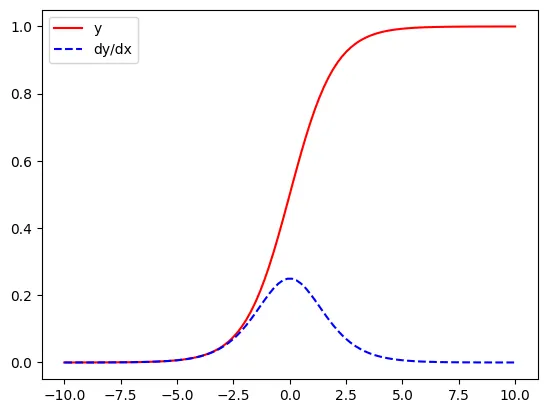
x = tf.linspace(-10, 10, 100)
with tf.GradientTape() as tape:
    tape.watch(x) #constant이므로 watch()함수 호출
    y = tf.nn.sigmoid(x)

dx = tape.gradient(y,x)

import matplotlib.pyplot as plt

plt.plot(x,y, 'r', label = 'y')
plt.plot(x, dx, 'b--', label = 'dy/dx')
plt.legend()
plt.show()- tape.watch(x): 원래는 constant이므로 그걸 복사해 마치 varient로 쓰게 해줌
- nn.sigmoid(x)로 정규화
'AI공부 > 자연어처리' 카테고리의 다른 글
| 5. RNN(Recurrent Neural Network)기초 (1) | 2026.02.22 |
|---|---|
| 4. FastText (0) | 2026.02.21 |
| 3. NSMC를 활용한 단어 분류 (1) | 2026.02.20 |
| 2. 자연어 처리(벡터화) (1) | 2026.02.16 |
| 1. 자연어처리 (0) | 2026.02.16 |
