
| 일 | 월 | 화 | 수 | 목 | 금 | 토 |
|---|---|---|---|---|---|---|
| 1 | 2 | 3 | 4 | 5 | 6 | |
| 7 | 8 | 9 | 10 | 11 | 12 | 13 |
| 14 | 15 | 16 | 17 | 18 | 19 | 20 |
| 21 | 22 | 23 | 24 | 25 | 26 | 27 |
| 28 | 29 | 30 |
Tags
- RDBMS
- 생성형 인공지능
- 기초
- 에이전트
- Transformer
- UMAP
- TTS
- 데이터엔지니어
- 알고리즘
- 딥러닝
- SQL
- 트랜스포머
- CNN
- 힙정렬
- 랭그래프
- 정보처리기사
- dementional reduction
- ASR
- 캐글
- Python
- CLIP
- python기초
- 데이터 시각화
- LangGraph
- 소프트웨어 개발
- 머신러닝
- RNN
- 객체지향
- python 기초
- 자연어처리
Archives
- Today
- Total
수달이네 기술 블로그
MySQL 설치 및 기본 문법 등 본문
실행방법
cmd > ‘mysql -u root -p’
C:\\Users\\suche>mysql -u root -p
'mysql' is not recognized as an internal or external command,
operable program or batch file.
- 위와 같이 뜬다면, mysql의 환경변수가 설정되지 않은 것이다.
환경변수 설정
설정에서 ‘환경변수’검색 > 환경변수 편집 > 시스템 변수의 path편집 > 새로만들기 후 ‘C:\Program Files\MySQL\MySQL Server 8.0\bin’ 으로 설정
다시 cmd > ‘mysql -u root -p’ > 비밀번호 입력
Microsoft Windows [Version 10.0.22631.6133]
(c) Microsoft Corporation. All rights reserved.

C:\\Users\\suche>mysql -u root -p
Enter password: ****
Welcome to the MySQL monitor.  Commands end with ; or \\g.
Your MySQL connection id is 21
Server version: 8.0.44 MySQL Community Server - GPL

Copyright (c) 2000, 2025, Oracle and/or its affiliates.

Oracle is a registered trademark of Oracle Corporation and/or its
affiliates. Other names may be trademarks of their respective
owners.

Type 'help;' or '\\h' for help. Type '\\c' to clear the current input statement.

mysql>
위와 같이 뜨면 설정완료
- 오라클은 사용자를 만들어줘야 하지만 mysql은 사용자를 무조건 만들 필요는 없다.
사용자 생성
mysql> CREATE USER '계정명'@'localhost' IDENTIFIED BY '1234';
Query OK, 0 rows affected (0.01 sec)
- 오라클과는 다르게 사용자 계정명을 쓸때 ‘계정명’@’localhost’를 사용해야한다.
권한 부여
mysql> GRANT ALL PRIVILEGES ON *.* TO '계정명'@'localhost';
Query OK, 0 rows affected (0.01 sec)
- ALL PRIVLEGES: 모든 권한을 주겠다.
- .: 모든 데이터 베이스. 모든 테이블이 대상
- 즉, 모든 데이터 베이스와 모든 테이블의 권한을 주겠다는 의미임.
권한 적용
mysql> FLUSH PRIVILEGES;
Query OK, 0 rows affected (0.01 sec)
mysql에서 사용자를 만드려면 사용자 생성 > 권한부여 > 권한적용의 순서가 필요하다
로그인
C:\\Users\\suche>mysql -u 계정명 -p
Enter password: ****
로그아웃
mysql> exit
Bye
디비버 연동
Connect to a database에서 mysql을 선택한다.
Username과 password를 입력하고, Test Connection을 하면 연동이 되지 않는데,
이때 edit driver > Libraries탭 > 맨 위의 버전 Delete로 삭제
https://dev.mysql.com/downloads/connector/j/
해당 링크에서 > 버전 8.0.33에 맞추어
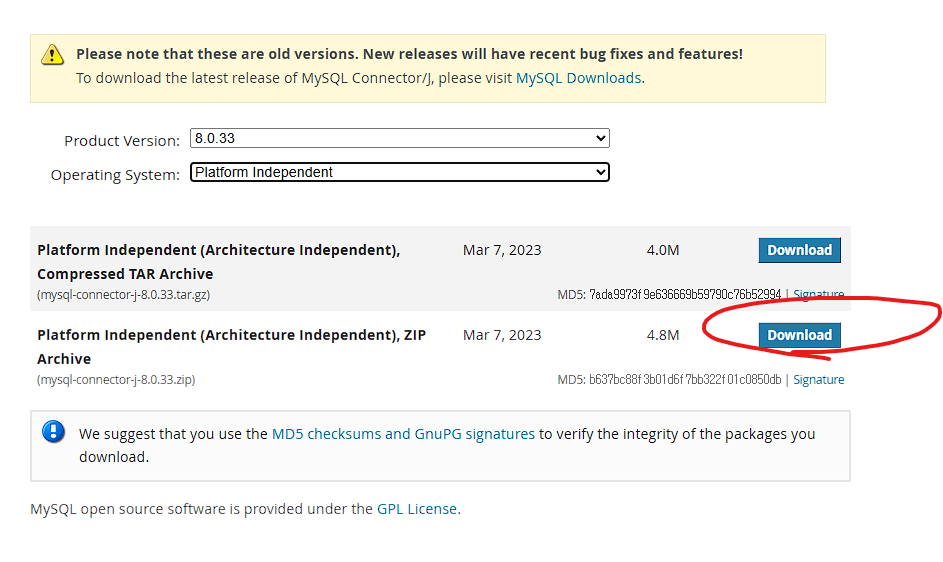
해당 ZIP파일 설치 후 압축 풀기
다시 Edit Driver 에서 Add File이후 거기에 있는 mysql- connector-j-8.0.33.jar을 선택 이후 OK

위와 같은 창이면 성공
mysql 문법
- 데이터베이스 관련 문법
- 데이터베이스를 생성하는 문법
mysql> CREATE DATABASE '데이터베이스명'; Query OK, 1 row affected (0.00 sec)- 데이터베이스를 확인하는 문법
mysql> SHOW databases; +--------------------+ | Database | +--------------------+ | day01 | | information_schema | | mysql | | performance_schema | | sakila | | sys | | test | | webdb | | world | +--------------------+ 9 rows in set (0.00 sec)- 데이터베이스 선택 문법
USE명령어를 사용하는 이유: mysql에서는 데이터베이스를 선택해야한다. 아니면 어떤 데이터베이스를 편집하는지 모르기 때문이다.mysql> USE webdb Database changed
- create문
- sequence가 없다.
이와 같이 적용 가능하나, auto_increment는 하나만 적용 가능하며, 해당 내용은 반드시 primary key로 지정해주어야 한다.create table tbl_user( id int auto_increment, name varchar(50) --varchar2가 아닌 varchar를 이용하여 만든다. ); -- SQL Error [1075] [42000]: Incorrect table definition; -- there can be only one auto column and it must be defined as a key - create table tbl_user( id int auto_increment primary key, name varchar(50) );
- 따라서 이걸 대신할 AUTO_INCREMENT를 사용한다.
- sequence가 없다.

- insert 및 select문 으로 조회
insert into tbl_user(name)
values('훈이');

select * from tbl_user;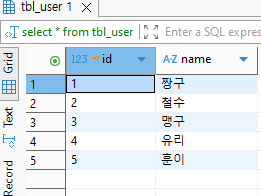
auto_increment를 사용하게 되면 컬럼명을 명시해주어야한다.
- 명시하지 않을 경우 오류발생!
insert into tbl_user
values(null, '훈이');
이것처럼 사용은 가능하지만, 매우 좋지 않은 습관이다.
- insert문을 사용할때는 auto_increment컬럼은 값을 직접 넣으면 안된다. > 컬럼명 지정하는 습관이 필요
오라클과 mysql자료형 차이
| 숫자타입 | 오라클 | mysql |
| 정수 | NUMBER | INT, BIGINT |
| 실수 | NUMBER(숫자, 숫자) | DECIMAL, DOUBLE, FLOAT |
| 자동증가 | SEQUENCE 생성 필요 | AUTO_INCREMENT 지원 |
| 문자타입 | 오라클 | mysql |
| 고정길이문자 | CHAR | char |
| 가변길이문자 | VARCHAR2 | VARCHAR |
| 긴텍스트 | CLOB | TEXT, MEDIUMTEXT, LONGTEXT |
| 날짜타입 | 오라클 | MYSQL |
| 날짜+시간 | DATE, TIMESTAMP | DATETIME, TIMESTAMP |
| 현재날짜/시간기본값 | SYSDATE | CURRENT_TIMESTAMP |
| 날짜만 | 없음 | DATE |
| 시간만 | 없음 | TIME |
| 논리타입 | 오라클 | MYSQL |
| 논리형 | 없음(1/0 으로 처리) | TINYINT(1), BOOLEAN |
| 이진타입(사진 등) | 오라클 | MYSQL |
| 이진 데이터 | BLOB | BLOB,MEDIUMBLOB,LONGBLOB |
JDBC 드라이버 / URL 구현 차이
오라클 JDBC
- Class.forName(”oracle.jdbc.driver.OracleDriver”);
- String url = “jdbc:oracle:thin:@localhost:1521:xe”;
mysql JDBC
- Class.forName(”com.mysql.cj.jdbc.Driver”);
- String url = “jdbc:mysql://localhost:3306/webdb”;
의 차이가 존재.
DDL문
CREATE 문
create table tbl_student(
	student_no int auto_increment primary key,
	student_name varchar(30) not null,
	--student_age int(3),
	student_age int,
	student_grade varchar(10),
	student_created_date DATETIME default current_timestamp
);
- default current_timestamp:디폴트값 생성일
- int(3)의 경우 mysql 8.0이후 이렇게 사용하지 않는다. 따라서 주석처리
drop 문
drop table tbl_student;
DML 문
SELECT 문MySQ
SELECT [DISTINCT] 컬럼명 [as 별칭]..
FROM 테이블명
[WHERE 컬럼명 조건]
[ORDER BY 정렬할 기준 컬럼 [ASC/DESC]];
select student_name "학생 이름", student_age 나이, student_created_date as "만든 날짜"
from tbl_student
where student_no <= 5
order by student_name;
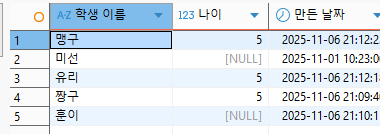
- 별칭은 띄어쓰기가 있으면 따옴표로 영역 지정, as를 생략해도 됨.
INSERT문
INSERT INTO 테이블명 (컬럼명, 컬럼명,...)
VALUES(값, 값,...);
insert into tbl_student(student_name)
values('훈이');

insert into tbl_student(student_name, student_age, student_grade)
values('짱구', 5, 1);

insert into tbl_student(student_name, student_created_date)
values('미선', '2025-11-01 10:23:00'); -- 생성일 직접 지정시 'YYYY-MM-DD HH:MM:SS'

insert into tbl_student(student_name, student_age, student_grade)
values('짱구', 5, 1), ('수지', 5, '유치원'), ('치타', 5, '유치원');
--여러값을 한번에 넣을 수 있다.
- 숫자는 오른쪽 문자는 왼쪽 정렬된다.
- 여러값을 한번에 넣어줄 수 있다.
UPDATE문
UPDATE 테이블명
SET 컬럼명 = 변경할 값, ...
WHERE 조건;
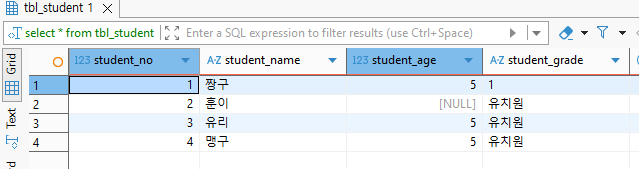
update tbl_student
set student_grade = '유치원'
where student_grade is null;
DELETE문
DELETE FROM 테이블명
WHERE 조건;
delete from tbl_student
where student_age is null;
'RDBMS' 카테고리의 다른 글
| MySQL JDBC로 구현 (0) | 2025.11.11 |
|---|---|
| 4. JDBC기능 구현 + SEQUENCE문 (0) | 2025.10.30 |
| 3. DDL, DML, DCL, TCL (0) | 2025.10.28 |
| 2. 제약조건(오라클) (0) | 2025.10.25 |
| 1. SQL 문 (오라클) (0) | 2025.10.23 |