
| 일 | 월 | 화 | 수 | 목 | 금 | 토 |
|---|---|---|---|---|---|---|
| 1 | 2 | 3 | 4 | 5 | 6 | |
| 7 | 8 | 9 | 10 | 11 | 12 | 13 |
| 14 | 15 | 16 | 17 | 18 | 19 | 20 |
| 21 | 22 | 23 | 24 | 25 | 26 | 27 |
| 28 | 29 | 30 |
Tags
- Python
- 힙정렬
- 자연어처리
- 머신러닝
- dementional reduction
- RDBMS
- 소프트웨어 개발
- 데이터엔지니어
- Transformer
- 데이터 시각화
- TTS
- python기초
- CNN
- LangGraph
- ASR
- 객체지향
- 딥러닝
- 캐글
- 생성형 인공지능
- 알고리즘
- UMAP
- 트랜스포머
- 정보처리기사
- RNN
- SQL
- python 기초
- 기초
- 에이전트
- CLIP
- 랭그래프
Archives
- Today
- Total
수달이네 기술 블로그
6.2. GroundingDINO를 활용한 Open-Vocabulary Zero-shot Object Detection모델 테스트 본문
AI공부/멀티모달
6.2. GroundingDINO를 활용한 Open-Vocabulary Zero-shot Object Detection모델 테스트
슬픈 수달이 2026. 3. 19. 14:30Grounding DINO 활용
import requests
import torch
import matplotlib.pyplot as plt
import matplotlib.patches as patches
from PIL import Image
from transformers import AutoProcessor, AutoModelForZeroShotObjectDetection
model_id = "IDEA-Research/grounding-dino-base" #Hugging face의 grounding-DINO사용
device = "cuda" if torch.cuda.is_available() else "cpu"- hugging face에서의 grounding-dino모델을 사용한다.
processor = AutoProcessor.from_pretrained(model_id)
model = AutoModelForZeroShotObjectDetection.from_pretrained(model_id).to(device)
model.eval()- 모델에 맞는 processor를 불러오고, Zero-shot Object Detection모델인 groundingDINO를 불러온다.
- 모델은 평가용
image_url = "<http://images.cocodataset.org/val2017/000000039769.jpg>"
image = Image.open(requests.get(image_url, stream=True).raw).convert("RGB")

text = "a cat. a remote control."
inputs = processor(images=image, text=text, return_tensors="pt").to(device)- 이미지 데이터셋은 coco dataset으로 사용한다.
- request get으로 이미지를 가져오는데, stream으로 가져오고 , raw데이터를 rgb형태로 가져온다.
- 그리고, processor를 통해 전처리를 해준다.
with torch.no_grad():
outputs = model(**inputs)- ** = 딕셔너리 unpacking operator이다.
with torch.no_grad(): # 이미지 임베딩 # processor가 이미지를 CLIP이 받는 파이토치 텐서 형태로 변환 (batch, 3, H, W) inputs_image = processor(images=images, return_tensors='pt', padding=True).to(device) # vision_model이 비전 트랜스포머를 통과시켜 출력 vision_out = model.vision_model(**inputs_image) # pooler_output = "대표 임베딩" 같은 역할을 하는 벡터(보통 CLS 토큰 기반) # visual_projection으로 CLIP 공통 임베딩 공간에 차원에 맞춰 projection 함 image_features = model.visual_projection(vision_out.pooler_output) # 텍스트 임베딩 # 텍스트도 토크나이징/패딩 후 모델 통과 inputs_text = processor(text=label_texts, return_tensors='pt', padding=True).to(device) text_out = model.text_model(**inputs_text) text_features = model.text_projection(text_out.pooler_output)- 위는 CLIP모델에서 따온 부분이다.
- 위에서 보면 넣는게 사실상 고정되어 있다. 그런데 이걸 간단하게 넣기 위해 딕셔너리형태로 만들어 한번에 넣어주는 방식을 사용한다면 쉽게 넣을 수 있지 않을까?
- 그런데 해당 딕셔너리 형태는 inputs에 들어있는 형태와 들어가야하는 매개변수는 일치함 → pixel_mask, input_ids, token_type_ids…
- 이때 위에서 배운 딕셔너리 unpacking operator를 input에 적용해 넣으면 자동으로 들어가서 깔끔하게 적용할 수 있게 되는 것이다
with torch.no_grad():
    # 이미지 임베딩
    # processor가 이미지를 CLIP이 받는 파이토치 텐서 형태로 변환 (batch, 3, H, W)
    inputs_image = processor(images=images, return_tensors='pt', padding=True).to(device)
    # vision_model이 비전 트랜스포머를 통과시켜 출력
    vision_out = model.vision_model(**inputs_image)
    # pooler_output = "대표 임베딩" 같은 역할을 하는 벡터(보통 CLS 토큰 기반)
    # visual_projection으로 CLIP 공통 임베딩 공간에 차원에 맞춰 projection 함
    image_features = model.visual_projection(vision_out.pooler_output)

    # 텍스트 임베딩
    # 텍스트도 토크나이징/패딩 후 모델 통과
    inputs_text = processor(text=label_texts, return_tensors='pt', padding=True).to(device)
    text_out = model.text_model(**inputs_text)
    text_features = model.text_projection(text_out.pooler_output)
즉, 위와 같이 바꿔도 상관 없다는 의미이다.
후처리 함수
results = processor.post_process_grounded_object_detection(
    outputs=outputs,
    input_ids=inputs.input_ids,
    threshold=0.3,
    text_threshold=0.3,
    target_sizes=[image.size[::-1]]  # (H, W)
)- threshold: 박스의 신뢰도를 어느정도까지 볼까?
- 이미지상 고양이를 찾았을 때 해당 고양이라고 확신하는 신뢰도(현업에서 0.2~0.3정도)
- text_threshold: 이박스가 이 라벨이 맞는지 확신할 수 있는지 에 대한 확률(현업에서 0.2~0.3정도)
- target_size = 원래 이미지 size = W, H순서 이걸 역순으로H, W로 변환
- image.size = PIL객체기 때문에 (W,H) 그러나 target_size는 H,W형태로 넣어주어야 한다.
박스와 이미지 시각화
fig, ax = plt.subplots(1, figsize=(10, 8))
ax.imshow(image)

for score, box, label in zip(
    results[0]["scores"].cpu(),
    results[0]["boxes"].cpu(),
    results[0]["text_labels"]
):
    x_min, y_min, x_max, y_max = box.tolist()
    width, height = x_max - x_min, y_max - y_min

    rect = patches.Rectangle(
        (x_min, y_min),
        width,
        height,
        linewidth=2,
        edgecolor="red",
        facecolor="none"
    )
    ax.add_patch(rect)

    caption = f"{label} ({score:.2f})"
    ax.text(
        x_min,
        max(0, y_min - 5),
        caption,
        fontsize=12,
        color="white",
        bbox=dict(facecolor="red", alpha=0.5, edgecolor="none", boxstyle="round,pad=0.3")
    )

ax.axis("off")

out_path = "test.png"
plt.tight_layout()
plt.savefig(out_path, dpi=200, bbox_inches="tight")
plt.show()

print(f"Saved: {out_path}")
위와 같이 출력 할 수 있다.
그러면

- 위같이 이미지를 친 박스 테두리와 그게 해당 이미지를 나타낼 확률을 표현한다.
텍스트 문장에 a cat ear.를 추가해주었더니
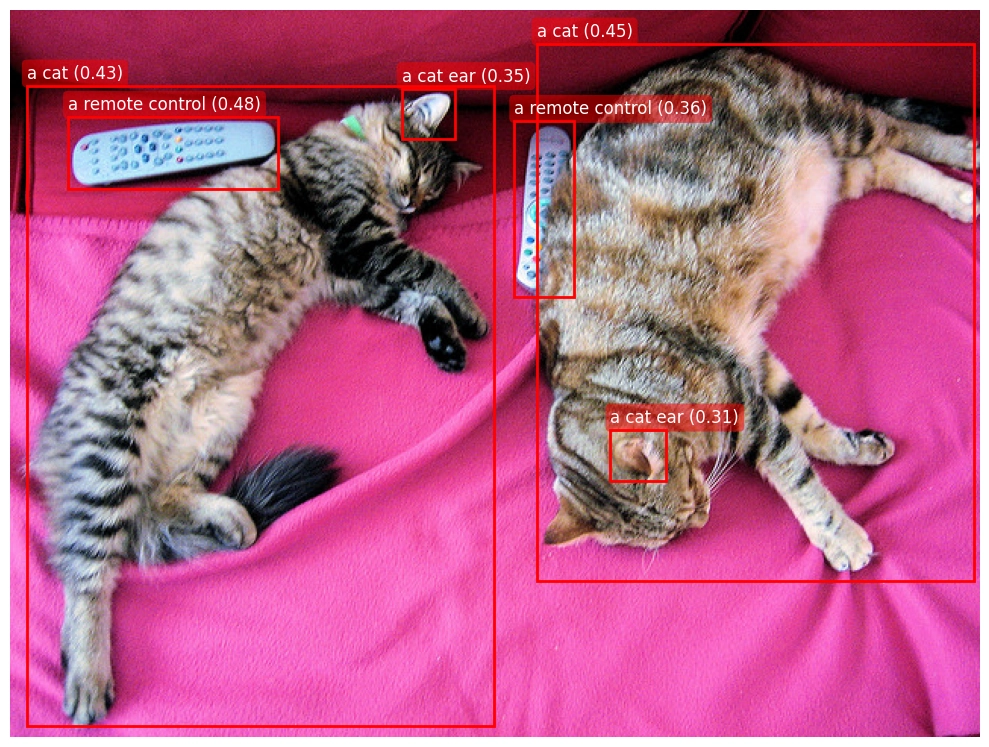
- 위와 같이 귀또한 잘 찾아주는 것을 알 수 있다.
- grounding DINO를 통해 텍스트 문장에서 이미지를 찾아볼 수 있었다.
- 박스가 이상한 부분을 처리하지 않고, 적당히 처리한 것을 확인할 수 있었다.
'AI공부 > 멀티모달' 카테고리의 다른 글
| 6. DINO(Zero-shot Object Detection, DETR, Hungarian matching, Swim Transformer) (0) | 2026.03.18 |
|---|---|
| 5. CLIP모델과 UMAP을 이용한 차원축소 시각화 (0) | 2026.03.17 |
| 4. 차원 축소 시각화(t-SNE, UMAP, initialization: random, PCA) (0) | 2026.03.16 |
| 3. 차원 축소(PCA, t-SNE, UMAP...) (0) | 2026.03.15 |
| 2. CLIP모델 구현 (0) | 2026.03.14 |
'AI공부/멀티모달' Related Articles
more
