
| 일 | 월 | 화 | 수 | 목 | 금 | 토 |
|---|---|---|---|---|---|---|
| 1 | 2 | 3 | 4 | 5 | 6 | |
| 7 | 8 | 9 | 10 | 11 | 12 | 13 |
| 14 | 15 | 16 | 17 | 18 | 19 | 20 |
| 21 | 22 | 23 | 24 | 25 | 26 | 27 |
| 28 | 29 | 30 |
Tags
- ASR
- 랭그래프
- 기초
- CLIP
- 자연어처리
- python 기초
- RDBMS
- dementional reduction
- 정보처리기사
- 힙정렬
- 딥러닝
- UMAP
- 데이터엔지니어
- 소프트웨어 개발
- CNN
- 객체지향
- 머신러닝
- 캐글
- 트랜스포머
- RNN
- LangGraph
- Transformer
- 에이전트
- python기초
- TTS
- Python
- 생성형 인공지능
- SQL
- 데이터 시각화
- 알고리즘
Archives
- Today
- Total
수달이네 기술 블로그
3. 랭그래프의 구성요소, 기능 구현 본문
상태(State)
에이전트가 현재 어떤 정보를 가지고 있는지를 표현하는 데이터 구조. → TypedDict, Pydantic BaseModel을 통해 정의 가능
- TypedDict: 단순히 키와 값의 명시하기만 할 뿐 잘못된 타입이 들어가도 실행 가능
- Pydantic BaseModel: 실제 실행 시점에 타입을 엄격하게 검사해 잘못된 데이터가 들어올 때, 오류 발생
- 상황에 따라 구조만 명시할 땐 TypedDict, 런타임에서 유효성을 보장할 땐 Pydantic을 활용함.
Typedict
from typing import TypedDict

class User(TypedDict):
    id: int
    name: str
    email: str

user1: User = {
    'id': 1,
    'name': '김사과',
    'email': 'apple@apple.com'
}
print(user1)
# {'id': 1, 'name': '김사과', 'email': 'apple@apple.com'}- 위처럼 TypedDict 클래스를 생성하고, 해당 클래스로 객체를 만들어낼 수 있다.
user1: User = {
    'id': 1,
    'name': 12345678, # 숫자로 표현해도 잘 작동함.
    'email': 'apple@apple.com'
}
print(user1)
# {'id': 1, 'name': 12345678, 'email': 'apple@apple.com'}- 만약 객체를 생성할 때 명시해준 타입과 달라도 잘 작동한다.
Pydantic BaseModel
from pydantic import BaseModel

class User(BaseModel):
    id: int
    name: str
    email: str

user: User = {
    'id': 1,
    'name': '김사과',
    'email': 'apple@apple.com'
}

# user_data = {
#     'id': 1,
#     'name': '김사과',
#     'email': 'apple@apple.com'
# }

# user1 = User(**user_data) # key와 value가 일치하는 경우에만 작동함.
print(user1)

# id=1 name='김사과' email='apple@apple.com'- Pydantic또한 TypedDict와 같은 방식으로 동작하는 것을 확인 가능하다.
- 아래 주석 처리 된 것은 아래와 같이 표현하는 것도 가능하다는 것을 나타낸다.
user_data = {
    'id': 1,
    'name': 12345678,
    'email': 'apple@apple.com'
}

user = User(**user_data)    # pydantic은 타입 검사를 엄격하게 수행하기 때문에,
                            # name 필드에 숫자가 들어가면 오류가 발생함.
                            # 오히려 오류가 발생하는 것이 더 안전한 코드라고 할 수 있음.
print(user)

# ValidationError: 1 validation error for User- 만약 Pydantic에서 입력된 값과 다른 값이 입력될 경우 ValidationError가 난다는 것을 알 수 있다.
랭그래프(LangGraph)
스키마 정의
from langgraph.graph import StateGraph, START, END
from typing_extensions import TypedDict

# 입력을 위한 스키마 정의
class InputState(TypedDict):
    question: str

# 출력을 위한 스키마 정의
class OutputState(TypedDict):
    answer: str

# 입력과 출력을 합한 종합 스키마 정의
class OverallState(InputState, OutputState):
    pass
입력 스키마: 데이터 검증의 역할(Input Validation)
- graph.invoke({”question”:str})의 형식이라는 것을 선언한다.
출력 스키마: 출력 필터링의 역할(Output Filtering)
- return값중 “answer”: str인 것을 출력 나머지, “question”:str등의 출력스키마에 없는 것은 제외
입출력 통합 스키마: 내부 구현의 은닉화의 역할(Encapsulation)
- 노드들은 OverallState스키마를 통해 자유롭게 통신하지만 외부는 Input, Output만 확인 가능
노드 정의, 엣지 추가
# 입력을 처리하고 답변을 생성하는 노드 정의
def answer_node(state: InputState):
    return {"answer": "bye", "question": state["question"]} # 상태 업데이트

graph_builder = StateGraph(OverallState, input_schema=InputState, output_schema=OutputState)
graph_builder.add_node(answer_node)  # 답변 노드 추가
graph_builder.add_edge(START, "answer_node")  # 시작 엣지 추가
graph_builder.add_edge("answer_node", END)  # 끝 엣지 추가
graph = graph_builder.compile()  # Compile the graph(그래프 준비해줘)

# 입력 invoke 및 결과 출력
print(graph.invoke({"question": "hi"}))

# {'answer': 'bye'}- 함수를 통해 입력을 처리, 답변을 생성하는 노드를 정의한다.
- StateGraph(): 이전에 정의한 스키마를 적용
- graph_builder.add_node: 노드 생성(위에선 답변 노드를 연결해준다.)
- 노드를 생성할 땐 함수 객체를 인식 가능하므로 함수 객체를 직접 전달한다.
- 노드의 이름이 함수의 이름과 동일한 이름을 가진다.(명시적으로 정할 수 있지만 자동을 주로 사용)
- graph_builder.add_edge: 엣지 생성
- 함수 객체를 인식하지 못하고, 노드이름을 적어줘야하므로 “answer_node”임
- START: 시작엣지
- END: 끝엣지
- compile: 연결한 그래프를 graph객체로 준비한다.
- graph에 어떤 값을 넣어도 지금은 bye가 잘 출력된다.(일렬형이므로)
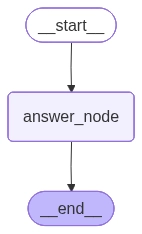
- 위는 graph를 출력했을때의 값이다.
리듀서 함수
State는 입력과 출력의 스키마를 정의한 후 이를 업데이트 하는 리듀서 함수와 함께 사용한다.
- 리듀서 함수: 노드가 반환한 업데이트 값을 어떻게 적용할지 결정하는 역할을 하는 함수
- Annotated와 리듀서 함수를 함께 쓰면, 상태 업데이트 시 단순 덮어쓰기 대신 지정된 동작을 수행한다.
- add를 통해 리스트 이어 붙이기, add_message로 대화 메세지 누적하기 등
Annotated와 리듀서 함수가 없는 결과를 보자
from typing import TypedDict, Annotated
from operator import add
from langgraph.graph import StateGraph, START, END
from typing_extensions import TypedDict

# 리듀서 add 적용 X
class TestState2(TypedDict):
    numbers: list[int]
    total: int

def node11(state: TestState2) -> TestState2:
    print(f"기존노드: {state.get('numbers', [])}")
    return{
        "numbers": [1,2],
        "total" : 10
    }

def node12(state: TestState2) -> TestState2:
    print(f"기존노드: {state.get('numbers', [])}")
    return{
        "numbers": [3,4],
        "total" : 20
    }

graph = StateGraph(TestState2)
graph.add_node(node11)
graph.add_node(node12)
graph.add_edge(START, "node11")
graph.add_edge("node11", "node12")
graph.add_edge("node12", END)
graph= graph.compile()

print("--리듀서 결과--")
result = graph.invoke({})

print(f"최종 numbers: {result['numbers']}")
print(f"최종 total: {result['total']}")

# --리듀서 결과--
# 기존노드: []
# 기존노드: [1, 2]
# 최종 numbers: [3, 4]
# 최종 total: 20- 기존 노드에 붙지 않고 새로 갱신되었으며,
- total 값 또한 새로운 값으로 갱신될 뿐이었다.
from typing import TypedDict, Annotated
from operator import add
from langgraph.graph import StateGraph, START, END
from typing_extensions import TypedDict

# 1. 리듀서(add) 적용한 State 정의
class TestState1(TypedDict):
    numbers: Annotated[list[int], add]
     # Annotated[타입, 리듀서함수]: Annotated자체는 포장하는 역할
    total: Annotated[int, add]

def node11(state: TestState1) -> TestState1:
    print(f"기존노드: {state.get('numbers', [])}")
    return{
        "numbers": [1,2],
        "total" : 10
    }

def node12(state: TestState1) -> TestState1:
    print(f"기존노드: {state.get('numbers', [])}")
    return{
        "numbers": [3,4],
        "total" : 20
    }

graph = StateGraph(TestState1)
graph.add_node(node11)
graph.add_node(node12)
graph.add_edge(START, "node11")
graph.add_edge("node11", "node12")
graph.add_edge("node12", END)
graph= graph.compile()

print("--리듀서 결과--")
result = graph.invoke({})

print(f"최종 numbers: {result['numbers']}")
print(f"최종 total: {result['total']}")

# --리듀서 결과--
# 기존노드: []
# 기존노드: [1, 2]
# 최종 numbers: [1, 2, 3, 4]
# 최종 total: 30- 위처럼 add가 리스트 일 때는 리스트의 뒤에 붙여주는 역할을 했고
- int정수형일 땐 값을 더해주는 역할을 했다.
- add함수는 단순 오퍼레이터 함수일 뿐이다. 이걸 만약 내가 새로 함수를 만들어서 사용할 수도 있는데.
from typing import TypedDict, Annotated
from langgraph.graph import StateGraph, START, END
from typing_extensions import TypedDict

def add(left, right):
    return left + right

# 1. 리듀서(add) 적용한 State 정의
class TestState1(TypedDict):
    numbers: Annotated[list[int], add]
     # Annotated[타입, 리듀서함수]: Annotated자체는 포장하는 역할
    total: Annotated[int, add]

def node11(state: TestState1) -> TestState1:
    print(f"기존노드: {state.get('numbers', [])}")
    return{
        "numbers": [1,2],
        "total" : 10
    }

def node12(state: TestState1) -> TestState1:
    print(f"기존노드: {state.get('numbers', [])}")
    return{
        "numbers": [3,4],
        "total" : 20
    }

graph = StateGraph(TestState1)
graph.add_node(node11)
graph.add_node(node12)
graph.add_edge(START, "node11")
graph.add_edge("node11", "node12")
graph.add_edge("node12", END)
graph= graph.compile()

print("--리듀서 결과--")
result = graph.invoke({})

print(f"최종 numbers: {result['numbers']}")
print(f"최종 total: {result['total']}")

# --리듀서 결과--
# 기존노드: []
# 기존노드: [1, 2]
# 최종 numbers: [1, 2, 3, 4]
# 최종 total: 30- add함수를 만들어도 같은 결과로 리듀서 함수가 작동하는 것을 확인 가능하다.
from langchain_core.messages import AnyMessage

from langgraph.graph.message import add_messages
from typing import Annotated
from typing_extensions import TypedDict

class State(TypedDict):
messages: Annotated[list[AnyMessage], add_messages]- add_message리듀서 함수는 출력된 메세지를 연결해주는 역할을 한다.
출력 메세지 타입
AIMessage: AI가 생성한 메세지를 나타내는 타입 HumanMessage: 사용자가 입력한 메세지를 나타내는 타입 AnyMessage: AI메세지, HumanMessage를 모두 포함하는 타입 SystemMessage: 시스템에서 생성된 메세지 (AI를 가스라이팅 할때 사용) ToolMessage: 도구 에서 생성된 메세지를 나타내는 타입
노드
에이전트가 실제로 수행해야 할 논리, 작업을 구현한 함수(이전의 node1등)
- 상태를 입력받아 새로운 값, 업데이트를 반환하는 단위
- add_node(”노드이름”, 함수)로 노드 등록(노드이름은 생략가능 → 함수 명으로 등록)
- 특정 로직을 실행한 후 상태에 반영할 딕셔너리를 반환한다.
- 그래프 흐름에서 순차적으로 연결되어 실행함. → 질문에 답하거나 결과를 가공
엣지
그래프에서 노드 간의 실행 흐름을 연결하는 경로, 에이전트가 어떤 순서로 작업을 이어갈지 정의
- 기본 엣지(Normal Edge): 노드가 끝나면 곧바로 다음 노드로 이동
- add_edge(”노드명”, “노드명”)으로 사용
- 조건부 엣지(Conditional Edge): 라우팅 함수를 통해 현재 상태, 결과를 검사한 뒤 조건에 따라 이동
- add_conditional_edges(”노드명”, 라우팅 함수, {True: “조건에 맞았을 때 연결할 노드명”, False:”조건에 맞지 않았을때 연결할 노드명”}
'AI공부 > AI Agent' 카테고리의 다른 글
| 5. 랭그래프에서 LLM으로 ToolCall하기 (0) | 2026.04.03 |
|---|---|
| 4. 랭그래프의 그래프 표현(상태 변화) (0) | 2026.03.31 |
| 2. LangGraph, LangChain의 구분 (0) | 2026.03.26 |
| 1. AI Agent (0) | 2026.03.25 |
| 0. 강화학습 (0) | 2026.03.24 |
'AI공부/AI Agent' Related Articles
more
