
| 일 | 월 | 화 | 수 | 목 | 금 | 토 |
|---|---|---|---|---|---|---|
| 1 | 2 | 3 | 4 | 5 | 6 | |
| 7 | 8 | 9 | 10 | 11 | 12 | 13 |
| 14 | 15 | 16 | 17 | 18 | 19 | 20 |
| 21 | 22 | 23 | 24 | 25 | 26 | 27 |
| 28 | 29 | 30 |
- 에이전트
- CLIP
- UMAP
- Transformer
- 트랜스포머
- dementional reduction
- LangGraph
- RDBMS
- 데이터 시각화
- TTS
- 알고리즘
- Python
- 자연어처리
- CNN
- 힙정렬
- 기초
- python기초
- 캐글
- 머신러닝
- 랭그래프
- ASR
- python 기초
- 데이터엔지니어
- 소프트웨어 개발
- 객체지향
- 딥러닝
- 생성형 인공지능
- 정보처리기사
- RNN
- SQL
- Today
- Total
수달이네 기술 블로그
5. 랭그래프에서 LLM으로 ToolCall하기 본문
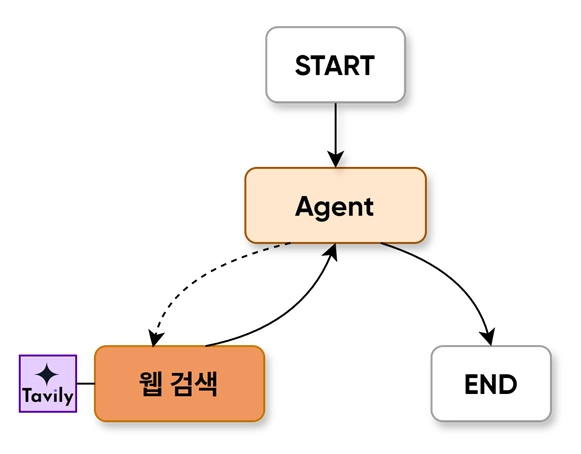
Tool Calling Agent

자신이 가진 지식 외에 외부 도구(API, 데이터베이스, 코드 실행기 등)을 호출해 문제를 해결하는 에이전트
- LLM이 사용자의 질문을 받는다.
- 해당 질문을 분석해 search_tool이 필요하다 판단하면 해당 도구를 호출하라는 메세지를 출력한다.
- 라우팅 함수를 통해 도구실행 노드로 이동하거나, 최종 답변 가능시 답변함.
- 도구를 실행할 경우 결과값을 다시 LLM에 전달한다.
- LLM이 결과를 보고 최종응답을 생성한다.
기존엔 LangChain이 위의 모든 과정을 블랙박스 상태로 스스로 해냈다. 그러나.
- 개발자가 직접 강제로 노드를 연결하지 못함.
- 도구를 무한히 호출하는 오류로 토큰 낭비가 생김.
- 등 위의 문제를 해결하기 위해 LangGraph를 사용해 구현하는게 더 좋다.
https://docs.langchain.com/oss/python/integrations/providers/overview
- LangChain 공식 홈페이지에 부를 수 있는 에이전트 리스트가 존재
웹 검색 툴(Tavily)
Tavily는 웹을 실시간으로 검색해 AI가 최신, 정확한 정보를 답변할 수 있도록 돕는 AI용 검색, 브라우징 API이다.
환경 설정
import getpass
import os

def _set_env(var: str):
	if not os.environ.get(var):
		os.environ[var] = getpass.getpass(f"{var}: ")

_set_env("OPEN_API_KEY")
_set_env("TAVILY_API_KEY")
만약 완전 로컬이라면 상관없지만 git이나 실무에서 api키를 직접 변수에 넣어 쓰는 건 매우 위험하다.
- 따라서 API키를 암호화해서 환경에 보관하도록 위와 같은 코드를 구성했다.
- 위의 API키는 각각 OpenAI와 Tavily에서 API키를 발급받아 입력해주었다.
위처럼 정확히 TAVILY_API_KEY라는 변수명으로 저장할 경우 이후 api키를 입력해야 할 곳을 비울경우 스스로 해당 변수의 내용을 찾는다.
툴 사용
from tavily import TavilyClient

tavily_client = TavilyClient()
#client = TavilyClient("tvly-dev-*************************************************")- 위 코드에서 원래는 아래와 같이 직접 api키를 넣는다. 그러나 난 위에서 설정해주었기 때문에 비워둘경우 스스로 TAVILY_API_KEY변수를 찾아 입력한다.
# 환경 변수에서 키를 가져와서 클라이언트에 직접 전달
tavily_api_key = os.environ.get("TAVILY_API_KEY")
tavily_client = TavilyClient(api_key=tavily_api_key)- 혹은 위처럼 클라이언트에 키를 직접 전달해도 된다.(직관적)
response = tavily_client.search("Who is faker?", max_results = 3)https://app.tavily.com/playground
- 자세한 속성 내용은 위 API Playground에 속성값들이 상세하게 출력된다.
- 위에서 사용한 내용은 쿼리, 결과값의 개수를 설정해주었다.
response['results']
# 이걸 실행하면 tavily가 검색한 결과를 보여줍니다.
[{'url': '<https://www.facebook.com/groups/neuesportscenter/posts/1830251560930025/>',
'title': 'Who is Faker? - Facebook',
'content': '#Kfriends #esports #ksports #sportstour Lee Sang-hyeok, also known as Faker, is a highly skilled professional gamer from South Korea who',
'score': 0.8684817,
'raw_content': None},
{'url': '<https://escharts.com/players/faker-south-korea>',
'title': 'Faker - Lee Sang-hyeok - LoL Player Profile - Esports Charts',
'content': 'Lee Sang-hyeok, better known as Faker, is a South Korean professional League of Legends player for T1. Formerly known as GoJeonPa on the Korean server.',
'score': 0.8286204,
'raw_content': None},
{'url': '<https://lol.fandom.com/wiki/Faker>',
'title': 'Faker - Leaguepedia | League of Legends Esports Wiki',
'content': 'Lee "Faker" Sang-hyeok (Hangul: 이상혁) is a League of Legends esports player, currently mid laner and part owner at T1.',
'score': 0.82560414,
'raw_content': None}]- 실제로 위와 같은 결과를 보여준다.
[{'url': '<https://yozm.wishket.com/magazine/questions/share/aUkZ2UpAe4F5XHne/>',
  'title': '페이커가 누구야 | 물어봐 AI - 요즘IT',
  'content': '그는 실명이 이상혁이며, 프로 게이머로서 여러 번의 세계 챔피언십에서 우승하면서 전설적인 이름을 얻었습니다. 페이커는 그의 놀라운 기술과 전략적인 판단력으로 유명',
  'score': 0.99994695,
  'raw_content': None},
 {'url': '<https://www.youtube.com/watch?v=m4lqJUK_rMU>',
  'title': '페이커가 누구야? (10주년 헌정)≪페이커(FAKER)≫4번째 우승 풀 ...',
  'content': '페이커가 누구야? (10주년 헌정)≪페이커(FAKER)≫4번째 우승 풀스토리 G.O.A.T 아마추어 고전파부터 전설의 월즈 4회 우승 GODS유퀴즈.',
  'score': 0.9999263,
  'raw_content': None},
 {'url': '<https://blog.naver.com/glassca/223647941665>',
  'title': '페이커(FAKER).그는 누구인가?!! : 네이버 블로그',
  'content': '페이커(Faker), 본명 이상혁은. 한국의 프로 e스포츠 선수로,. 리그 오브 레전드(LoL) 분야에서 세계적으로. 유명한 선수입니다.',
  'score': 0.9996458,
'raw_content': None}]- 한글로 검색하면 한글로 답을 준다.
# qna_search: Tavily가 반환한 최종 답변. 보통 문자열(string) 형태이며, 한두 문장 정도로 정리된 응답을 제공합니다.
answer = tavily_client.qna_search(query="What is AI Agent?")
answer
#'An AI agent is a software program that autonomously performs tasks to meet set goals, often collaborating with others to automate complex workflows. They use tools and adapt in real time. They are built by a team of inventors at Amazon.'- qna_search는 tavily가 문자열 형태로 최종 답변을 정리해서 한두줄정도로 출력해준다.
TavilySearch
이전의 Tavily_client는 개발자가 직접 사용하기 위한 도구였다.
그러나 이 langchain_tavily에서 지원하는 모듈인 TavilySearch는 LangGraph나 LangChain에이전트의 tools리스트에 넣어 LLM이 사용하는 모듈이다.
from langchain_tavily import TavilySearch

tool = TavilySearch(max_results=3)
tool.invoke("What's a 'node' in LangGraph?")- invoke로 단일 도구를 실행해주는 메서드를 이용
- 즉, 이전의 랭그래프에선 그래프를 실행하기 위해 graph.invoke를 사용한 것과 비슷.
{'query': "What's a 'node' in LangGraph?",
 'follow_up_questions': None,
 'answer': None,
 'images': [],
 'results': [{'url': '<https://www.youtube.com/watch?v=FVuv5MPBzPI>',
   'title': 'Understanding Nodes, Edges, and State Management - YouTube',
   'content': 'LangGraph Tutorial: Understanding Nodes, Edges, and State Management\\nAnalytics Vidhya\\n140000 subscribers\\n3 likes\\n131 views\\n12 Feb 2026\\nIn this video, we dive deep into the fundamental building blocks of LangGraph, the powerful framework for building complex, agentic LLM workflows. 🚀\\nIf you want to move beyond simple linear chains and build advanced AI applications that can think, loop, and remember, understanding these four core concepts is essential.\\nWhat you will learn in this lesson:\\nThe 4 Pillars of LangGraph:\\n1. Graphs: Pictorial representations of your end-to-end workflow.\\n2. Nodes: Individual steps like Python functions, agent invocations, or tool calls.\\n3. Edges: The rules and logic that connect nodes and define the flow.\\n4. State: The shared data object (using TypedDict) that persists across your graph.\\nThe Development Workflow: How to define state, write node functions, wire edges, and compile your graph.\\nHands-on Demo: Follow along as we build a "Hello World" LangGraph application that simulates a chat interaction from scratch.\\nPrerequisites:\\nBasic knowledge of Python and familiarity with LangChain.\\nThis is part of our series on the Foundations of LangGraph. Don\\'t forget to like and subscribe to stay updated on future modules where we add LLMs and real-world tools to these workflows!\\n#LangGraph #AIAgents #LangChain #Python #GenerativeAI #LLMWorkflows #machinelearning \\n\\nWe will discuss the following-\\nlanggraph multi agent\\nlanggraph agents\\nlanggraph project\\nlanggraph playlist\\nlanggraph and langchain\\nlanggraph studio\\nlanggraph ai agents\\nlanggraph multi agent tutorial\\nlanggraph chatbot\\nlanggraph multi agent project\\nlanggraph memory\\nlanggraph js\\n\\n',
   'score': 0.72884524,
   'raw_content': None},
  {'url': '<https://www.linkedin.com/pulse/langgraph-nodes-agents-multi-agent-composition-walid-negm-kaxwe>',
   'title': 'LangGraph — Nodes, Agents, and Multi-Agent Composition - LinkedIn',
   'content': 'Each node in the graph (or workflow) performs an operation — such as reasoning, invoking a tool, or applying routing logic — while edges define',
   'score': 0.7045877,
   'raw_content': None},
  {'url': '<https://medium.com/@official.hardcodeconcepts/nodes-edges-states-graph-in-langgraph-basics-3bdc7e9954b6>',
   'title': 'Nodes, Edges, States & Graph in LangGraph — Basics - Medium',
   'content': '# Nodes, Edges, States & Graph in LangGraph — Basics. A **Graph** in LangGraph is a beautiful **combination of Nodes, Edges, and States**. Got no money!")        if state["make_up"] == False:            print("😱 Omg, no makeup too.")            return "Work"        else:            print("🙄 Guess I\\'ll just shut up and go Home.")            return "Home"from langgraph.graph import StateGraph, START, END# Define the Graphbuilder = StateGraph(WalletState)# Adding the Nodesbuilder.add_node("Car", CarNode)builder.add_node("Mall", MallNode)builder.add_node("Home", HomeNode)builder.add_node("Work", WorkNode)# Adding the Edgesbuilder.add_edge(START, "Car")builder.add_conditional_edges("Car", where_to_go)builder.add_edge("Work", "Car")  # Work feeds back into the cyclebuilder.add_edge("Mall", END)builder.add_edge("Home", END)# Compile the Graphgraph = builder.compile() from import from import class WalletState TypedDict float bool None bool None def CarNodestate: WalletState print "🚗 Inside the Car" return def MallNodestate: WalletState print "🛍️ Inside the Mall" print"Buying Makeup... And most importantly, **LangGraph lets you build practical, decision-making AI agents** — so you don’t have to suffer through **“should I spend money or save money?”** dilemmas alone. 🎉 We covered **Nodes, Edges, States, and Graphs**, all while keeping things fun (because debugging AI agents is stressful enough, right?).',
   'score': 0.6821721,
   'raw_content': None}],
 'response_time': 0.82,
 'request_id': '40f2419c-cd4c-4565-9f27-3e4dc5e7e120'}
위와 같은 형식으로 출력해준다.
result블록 안의 내용은 tavily와 같으며, 다른 점으로는 쿼리, answer등의 블록이 추가되었다.
invoke_with_toolcall = tool.invoke({"args": {'query': "What's a 'node' in LangGraph?"}, "type": "tool_call", "id": "foo", "name": "tavily_search"})
invoke_with_toolcall
arg: Tool에 전달할 값
query: 검색할 내용
type: 호출이 “tool_Call”임을 나타냄
id: 호출의 고유 식별자
name: 호출할 도구 이름(tavily_search)
출력은 단순 문자열이 아닌, JSON구조로 호출 이벤트처럼 전달한다.
ToolMessage(content='{"query": "What\'s a \'node\' in LangGraph?", "follow_up_questions": null, "answer": null, "images": [], "results": [{"url": "https://medium.com/@vivekvjnk/langgraph-basics-understanding-state-schema-nodes-and-edges-77f2fd17cae5", "title": "LangGraph Basics: Understanding State, Schema, Nodes, and Edges", "content": "# LangGraph Basics: Understanding State, Schema, Nodes, and Edges. At its core, it focuses on communication between nodes via structured states and logical edges, enabling a flexible and efficient workflow. ## LangGraph Basics: Understanding State, Schema, Nodes, and Edges. At its core, it focuses on communication between nodes via structured states and logical edges, enabling a flexible and efficient workflow. ### Nodes&Edges: A Messaging App Analogy. These predefined structures in the messaging app are synonymous with the schema of the state in LangGraph. Just as a messaging app ensures all interactions (messages) follow a consistent format, the schema in LangGraph ensures the state passed along edges is structured and interpretable. This static schema allows nodes to rely on a consistent state format, ensuring seamless communication along edges throughout the graph. In this article, we explored the foundational concepts of graph-based systems, drawing parallels to familiar messaging applications to illustrate how edges, nodes, and state transitions function seamlessly in dynamic workflows.", "score": 0.9998104, "raw_content": null}, {"url": "https://www.linkedin.com/pulse/langgraph-nodes-agents-multi-agent-composition-walid-negm-kaxwe", "title": "LangGraph — Nodes, Agents, and Multi-Agent Composition - LinkedIn", "content": "Each node in the graph (or workflow) performs an operation — such as reasoning, invoking a tool, or applying routing logic — while edges define", "score": 0.99958915, "raw_content": null}, {"url": "https://www.reddit.com/r/LangChain/comments/1nbd9g5/langgraph_nodes_instad_of_tools/", "title": "LangGraph - Nodes instad of tools : r/LangChain - Reddit", "content": "It decides what tool to call, if the tool output is sufficient, and when to move on. On the contrary, if you\'re building a more deterministic", "score": 0.99926203, "raw_content": null}], "response_time": 0.9, "request_id": "c41bdc26-6401-4c04-98e5-3fc98be10258"}', name='tavily_search', tool_call_id='foo')
위같은 결과가 출력된다.
- 자세히보면 결과값 외에 내가 넣었던 툴 이름, 아이디 등이 보인다.
Tavily Search Results
from langchain_community.tools.tavily_search import TavilySearchResults

tool = TavilySearchResults(max_results=2)
tool.invoke("What's a 'node' in LangGraph?")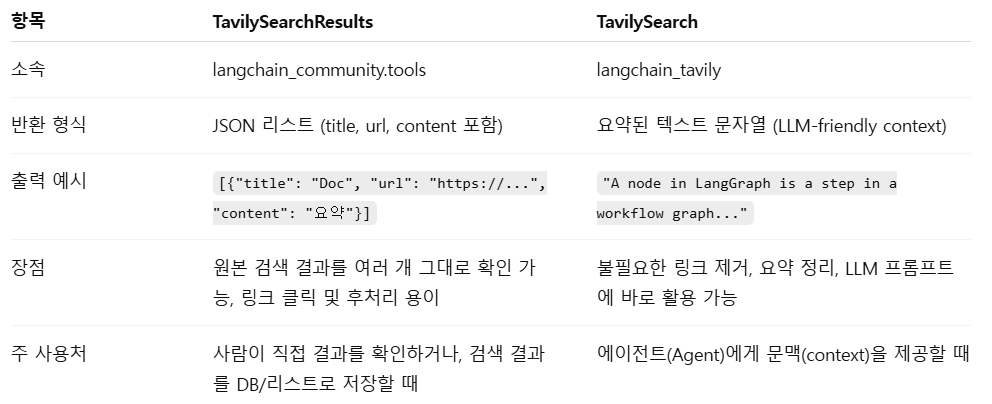
- TavilySearchResults는 위와 같은 차이점이 존재한다.
# results에 들어 있는 정보
invoke_with_toolcall.content
# '[{"title": "Graph API overview - Docs by LangChain", "url": "<https://docs.langchain.com/oss/python/langgraph/graph-api>", "content": "\\u200b\\\\n\\\\nNodes\\\\n\\\\nIn LangGraph, nodes are Python functions (either synchronous or asynchronous) that accept the following arguments:\\\\n1.   `state`—The state of the graph\\\\n2.   `config`—A `RunnableConfig` object that contains configuration information like `thread_id` and tracing information like `tags`\\\\n3.   `runtime`—A `Runtime` object that contains runtime `context` and other information like `store` and `stream_writer`\\\\n\\\\nSimilar to `NetworkX`, you add these nodes to a graph using the `add_node` method:\\\\n\\\\nCopy\\\\n\\\\n```\\\\nfrom dataclasses import dataclass\\\\nfrom typing_extensions import TypedDict\\\\n\\\\nfrom langchain_core.runnables import RunnableConfig\\\\nfrom langgraph.graph import StateGraph\\\\nfrom langgraph.runtime import Runtime\\\\n\\\\nclass State(TypedDict):\\\\n    input: str\\\\n    results: str [...] LangGraph APIs\\\\n\\\\nGraph API\\\\n\\\\nGraph API overview\\\\n\\\\nCopy page\\\\n\\\\nCopy page\\\\n\\\\n\\u200b\\\\n\\\\nGraphs\\\\n\\\\nAt its core, LangGraph models agent workflows as graphs. You define the behavior of your agents using three key components:\\\\n1.   `State`: A shared data structure that represents the current snapshot of your application. It can be any data type, but is typically defined using a shared state schema.\\\\n2.   `Nodes`: Functions that encode the logic of your agents. They receive the current state as input, perform some computation or side-effect, and return an updated state.\\\\n3.   `Edges`: Functions that determine which `Node` to execute next based on the current state. They can be conditional branches or fixed transitions. [...] By composing `Nodes` and `Edges`, you can create complex, looping workflows that evolve the state over time. The real power, though, comes from how LangGraph manages that state.To emphasize: `Nodes` and `Edges` are nothing more than functions—they can contain an LLM or just good ol’ code.In short: _nodes do the work, edges tell what to do next_.LangGraph’s underlying graph algorithm uses message passing to define a general program. When a Node completes its operation, it sends messages along one or more edges to other node(s). These recipient nodes then execute their functions, pass the resulting messages to the next set of nodes, and the process continues. Inspired by Google’s Pregel system, the program proceeds in discrete “super-steps.”A super-step can be considered a single iteration", "score": 0.8877607}, {"title": "Understanding Core Concepts of LangGraph (Deep Dive) - Dev.to", "url": "<https://dev.to/raunaklallala/understanding-core-concepts-of-langgraph-deep-dive-1d7h>", "content": "### 1. Nodes: The Execution Units\\\\n\\\\nA Node is basically “a single action.” Imagine breaking your workday into steps: checking email, making coffee, writing code, or scheduling a meeting. Each of those is a Node.\\\\n\\\\nIn LangGraph, a Node can be many things:\\\\n\\\\n A large language model call (like GPT, Gemini, or LLaMA).\\\\n A tool (search engine lookup, calculator, weather API, database query).\\\\n A custom function (Python function, regex cleaner, summarizer).\\\\n\\\\nEach Node is like a worker with a simple contract: it takes an input, does its piece of the job, and pushes out an output.\\\\n\\\\nEveryday example:  \\\\n  \\\\n Think about ordering food on a delivery app. [...] Skip to content\\\\n\\\\nLog in    Create account\\\\n\\\\n## DEV Community\\\\n\\\\nRaunak ALI\\\\n\\\\nPosted on\\\\n\\\\n# Understanding Core Concepts of LangGraph (Deep Dive)\\\\n\\\\n#langgraph #genai #llm #python\\\\n\\\\n# Understanding Core Concepts of LangGraph (Deep Dive)\\\\n\\\\nIn the last chapter, we talked about why LangGraph feels like a shift compared to traditional “linear chains.” Now, let’s slow down and zoom into its DNA. At the core, LangGraph has three simple but powerful building blocks: Nodes, Edges, and State.\\\\n\\\\nIf those names sound abstract, don’t worry, by the end of this chapter, you’ll see them the same way you see apps on your phone or stops on a subway map. They’re pieces you already know, just arranged in a smarter way.\\\\n\\\\n### 1. Nodes: The Execution Units [...] This trio (Nodes, Edges, State) is why LangGraph isn’t just a library, but a framework for persistent, adaptive, multi-step systems you can actually trust.\\\\n\\\\n## Top comments (0)\\\\n\\\\nSubscribe\\\\n\\\\nFor further actions, you may consider blocking this person and/or reporting abuse\\\\n\\\\nWe\\'re a place where coders share, stay up-to-date and grow their careers.\\\\n\\\\nLog in   Create account", "score": 0.8719229}]'
# 모델의 모든 실행결과
invoke_with_toolcall.artifact
# {'query': "What's a 'node' in LangGraph?",
# 'response_time': 1.28,
# 'follow_up_questions': None,
# 'answer': None,
# 'images': [],
# 'results': [{'url': '<https://docs.langchain.com/oss/python/langgraph/graph-api>',
# 'title': 'Graph API overview - Docs by LangChain',
# 'content': '\\u200b\\n\\nNodes\\n\\nIn LangGraph, nodes are Python functions (either synchronous or asynchronous) that accept the following arguments:\\n1. `state`—The state of the graph\\n2. `config`—A `RunnableConfig` object that contains configuration information like `thread_id` and tracing information like `tags`\\n3. `runtime`—A `Runtime` object that contains runtime `context` and other information like `store` and `stream_writer`\\n\\nSimilar to `NetworkX`, you add these nodes to a graph using the `add_node` method:\\n\\nCopy\\n\\n```\\nfrom dataclasses import dataclass\\nfrom typing_extensions import TypedDict\\n\\nfrom langchain_core.runnables import RunnableConfig\\nfrom langgraph.graph import StateGraph\\nfrom langgraph.runtime import Runtime\\n\\nclass State(TypedDict):\\n input: str\\n results: str [...] LangGraph APIs\\n\\nGraph API\\n\\nGraph API overview\\n\\nCopy page\\n\\nCopy page\\n\\n\\u200b\\n\\nGraphs\\n\\nAt its core, LangGraph models agent workflows as graphs. You define the behavior of your agents using three key components:\\n1. `State`: A shared data structure that represents the current snapshot of your application. It can be any data type, but is typically defined using a shared state schema.\\n2. `Nodes`: Functions that encode the logic of your agents. They receive the current state as input, perform some computation or side-effect, and return an updated state.\\n3. `Edges`: Functions that determine which `Node` to execute next based on the current state. They can be conditional branches or fixed transitions. [...] By composing `Nodes` and `Edges`, you can create complex, looping workflows that evolve the state over time. The real power, though, comes from how LangGraph manages that state.To emphasize: `Nodes` and `Edges` are nothing more than functions—they can contain an LLM or just good ol’ code.In short: _nodes do the work, edges tell what to do next_.LangGraph’s underlying graph algorithm uses message passing to define a general program. When a Node completes its operation, it sends messages along one or more edges to other node(s). These recipient nodes then execute their functions, pass the resulting messages to the next set of nodes, and the process continues. Inspired by Google’s Pregel system, the program proceeds in discrete “super-steps.”A super-step can be considered a single iteration',
# 'score': 0.8877607,
# 'raw_content': None},
# {'url': '<https://dev.to/raunaklallala/understanding-core-concepts-of-langgraph-deep-dive-1d7h>',
# 'title': 'Understanding Core Concepts of LangGraph (Deep Dive) - Dev.to',
# 'content': "### 1. Nodes: The Execution Units\\n\\nA Node is basically “a single action.” Imagine breaking your workday into steps: checking email, making coffee, writing code, or scheduling a meeting. Each of those is a Node.\\n\\nIn LangGraph, a Node can be many things:\\n\\n A large language model call (like GPT, Gemini, or LLaMA).\\n A tool (search engine lookup, calculator, weather API, database query).\\n A custom function (Python function, regex cleaner, summarizer).\\n\\nEach Node is like a worker with a simple contract: it takes an input, does its piece of the job, and pushes out an output.\\n\\nEveryday example: \\n \\n Think about ordering food on a delivery app. [...] Skip to content\\n\\nLog in Create account\\n\\n## DEV Community\\n\\nRaunak ALI\\n\\nPosted on\\n\\n# Understanding Core Concepts of LangGraph (Deep Dive)\\n\\n#langgraph #genai #llm #python\\n\\n# Understanding Core Concepts of LangGraph (Deep Dive)\\n\\nIn the last chapter, we talked about why LangGraph feels like a shift compared to traditional “linear chains.” Now, let’s slow down and zoom into its DNA. At the core, LangGraph has three simple but powerful building blocks: Nodes, Edges, and State.\\n\\nIf those names sound abstract, don’t worry, by the end of this chapter, you’ll see them the same way you see apps on your phone or stops on a subway map. They’re pieces you already know, just arranged in a smarter way.\\n\\n### 1. Nodes: The Execution Units [...] This trio (Nodes, Edges, State) is why LangGraph isn’t just a library, but a framework for persistent, adaptive, multi-step systems you can actually trust.\\n\\n## Top comments (0)\\n\\nSubscribe\\n\\nFor further actions, you may consider blocking this person and/or reporting abuse\\n\\nWe're a place where coders share, stay up-to-date and grow their careers.\\n\\nLog in Create account",
# 'score': 0.8719229,
# 'raw_content': None}],
# 'request_id': 'd08166ed-819c-4d03-94d2-57ae9524a39e'}랭그래프 툴 설정
from langchain_core.tools import tool

@tool
def add(a: int, b: int)-> int:
	"""두 개의 정수를 입력받아 더한 값을 반환한다."""
	return a+b

@tool
def multiply(a: int, b:int)->int:
	"""두 개의 정수를 입력받아 곱한 값을 반환한다."""
	return a*b

tools = [add, multiply]
랭체인에서 tools의 tool모듈은 @tool 데코레이터를 사용해 함수를 tool로 만들어줄 수 있다.
- 함수내의 “”” (docstring)은 단순 주석이 아닌 LLM이 도구를 사용하는 설명서 역할을 한다.
- 코드 실행 전 LLM은 함수이름, 도구 설명 (주석)을 확인해 판단한다.
예를들어
@tool
def search_database(query: str):
    """데이터베이스를 검색합니다."""
return "결과..."- 위와 같이 주석이 부실하면 LLM은 어떤 데이터가 들어있는지 몰라 사용하지 않는다.
@tool
def search_database(query: str):
    """
    사용자의 구매 이력이나 배송 상태를 확인해야 할 때 이 도구를 사용하세요.
    입력값(query)은 사용자의 성함이나 주문 번호여야 합니다.
    """
return "결과..."- 반대로 주석이 잘 달려있다면 LLM이 사용하기 편해진다.
- 따라서 주석에는 목적, 사용시점, 인자등을 적어준다.
LLM 설정
from langchain_openai import ChatOpenAI

llm = ChatOpenAI(model="gpt-4o")
llm_with_tools = llm.bind_tools(tools)- LLM을 통해 OpenAI의 gpt-4o를 모델로 설정해준다.
- llm.bind_tools를 통해 tool리스트를 LLM에 바인딩해준다.
query = "What is 3 * 12? Also, what is 11 + 49?"

llm_with_tools.invoke(query).tool_calls

# [{'name': 'multiply',
#   'args': {'a': 3, 'b': 12},
#   'id': 'call_4MZhNkCnsXY0DbgHq2YvJtYv',
#   'type': 'tool_call'},
#  {'name': 'add',
#   'args': {'a': 11, 'b': 49},
#   'id': 'call_izjfLykyCMw6nColpa4VJvJG',
# 'type': 'tool_call'}]- 그럼 위와 같이 툴을 스스로 찾아 스스로 입력한다.
query = "What is 12 % 2?"

llm_with_tools.invoke(query).tool_calls

# []- 반대로 사용할 툴이 없으면빈 리스트를 출력한다.
llm_with_tools = llm.bind_tools(tools,
    tool_choice={"type": "function", "function": {"name": "multiply"}}
)

resp = llm_with_tools.invoke("What is 3 * 12? Use tool.")
print(resp.tool_calls)  # 이제 비어있지 않음'

# [{'name': 'multiply', 'args': {'a': 3, 'b': 12}, 'id': 'call_0KqQ3c3TTUJObRYoziK9gysf', 'type': 'tool_call해- 위처럼 툴을 직접 다.
LLM을 통한 Tavily호출
from langchain_openai import ChatOpenAI

tool = TavilySearch(max_result = 2)
tools = [tool]

llm = ChatOpenAI(model = "gpt-4o")
llm_with_tools = llm.bind_tools(tools)- Tavily를 tools리스트에 넣어 바인딩해준다.
Tavily가 필요없는 상황이라면.
llm_with_tools.invoke("안녕")

# AIMessage(content='안녕하세요! 무엇을 도와드릴까요? 궁금한 점 질문해 주시거나, 글쓰기/번역/요약, 아이디어 brainstorm, 코딩 도움 등 필요하신 걸 알려주시면 바로 도와드릴게요.', additional_kwargs={'refusal': None}, response_metadata={'token_usage': {'completion_tokens': 318, 'prompt_tokens': 1270, 'total_tokens': 1588, 'completion_tokens_details': {'accepted_prediction_tokens': 0, 'audio_tokens': 0, 'reasoning_tokens': 256, 'rejected_prediction_tokens': 0}, 'prompt_tokens_details': {'audio_tokens': 0, 'cached_tokens': 0}}, 'model_provider': 'openai', 'model_name': 'gpt-5-nano-2025-08-07', 'system_fingerprint': None, 'id': 'chatcmpl-DKilQgcAUDNAalm1n3LPgJWhwKoC7', 'service_tier': 'default', 'finish_reason': 'stop', 'logprobs': None}, id='lc_run--019d0091-3526-78e2-94a2-eaebb05c53dd-0', tool_calls=[], invalid_tool_calls=[], usage_metadata={'input_tokens': 1270, 'output_tokens': 318, 'total_tokens': 1588, 'input_token_details': {'audio': 0, 'cache_read': 0}, 'output_token_details': {'audio': 0, 'reasoning': 256}})- AI는 LLM이 직접 답해준다.
반대로 검색이 필요한 상황이라면.
llm_with_tools.invoke("What is Langgraph?")

#AIMessage(content='', additional_kwargs={'refusal': None}, response_metadata={'token_usage': {'completion_tokens': 154, 'prompt_tokens': 1273, 'total_tokens': 1427, 'completion_tokens_details': {'accepted_prediction_tokens': 0, 'audio_tokens': 0, 'reasoning_tokens': 128, 'rejected_prediction_tokens': 0}, 'prompt_tokens_details': {'audio_tokens': 0, 'cached_tokens': 1024}}, 'model_provider': 'openai', 'model_name': 'gpt-5-nano-2025-08-07', 'system_fingerprint': None, 'id': 'chatcmpl-DKilTqk7R2E1wyIL2YtFoiOgtGEEL', 'service_tier': 'default', 'finish_reason': 'tool_calls', 'logprobs': None}, id='lc_run--019d0091-3f23-7892-9f8a-2fd93fc7eecb-0', tool_calls=[{'name': 'tavily_search', 'args': {'query': 'Langgraph'}, 'id': 'call_C4sUHGkwqDZ8LSjf8Voa6PKR', 'type': 'tool_call'}], invalid_tool_calls=[], usage_metadata={'input_tokens': 1273, 'output_tokens': 154, 'total_tokens': 1427, 'input_token_details': {'audio': 0, 'cache_read': 1024}, 'output_token_details': {'audio': 0, 'reasoning': 128}})- 위와 같이 tool이 필요하다 신호를 보낸다. 그러나 아직 툴을 사용하지 않음.
llm_with_tools.invoke("What is Langgraph?").tool_calls

# [{'name': 'tavily_search',
# 'args': {'query': 'Langgraph'},
# 'id': 'call_OeLUsVI7LvDbgqWb3xIfyyJV',
# 'type': 'tool_call'}]- 위와 같이 tool_calls를 사용하면 어디서 툴을 불러오려했는지 자세한 정보가 나타난다.
'''
AIMessage(content='',
additional_kwargs={'refusal': None},
response_metadata={
	'token_usage': {
		'completion_tokens': 282, 'prompt_tokens': 1273, 'total_tokens': 1555, 'completion_tokens_details': {
		'accepted_prediction_tokens': 0,
		'audio_tokens': 0, 'reasoning_tokens': 256,
		'rejected_prediction_tokens': 0
		},
	'prompt_tokens_details': {'audio_tokens': 0, 'cached_tokens': 1024
	}
},
'model_provider': 'openai', 'model_name': 'gpt-5-nano-2025-08-07',
'system_fingerprint': None,
'id': 'chatcmpl-DKiZF02rjYIK61B2mrtN109HSzSUc',
'service_tier': 'default', 'finish_reason': 'tool_calls', 'logprobs': None},
id='lc_run--019d0085-af24-7cc1-8f95-05a41cfd449d-0',
tool_calls=[{'name': 'tavily_search', 'args': {'query': 'Langgraph'},
'id': 'call_UlmoRCol3Njzw3FyzeMvI6uG', 'type': 'tool_call'}],
invalid_tool_calls=[], usage_metadata={'input_tokens': 1273,
'output_tokens': 282, 'total_tokens': 1555,
'input_token_details': {'audio': 0, 'cache_read': 1024},
'output_token_details': {'audio': 0, 'reasoning': 256}})
'''

# tool_calls = []: 모델이 툴을 호출하려고 시도한 모든 경우가 담겨지는 데이터
#  - name(툴 이름), args, id, type
# invalid_tool_calls = []: 모델이 툴을 호출하려다 형식을 잘못 만든 경우 담겨지는 데이터
#  - name, args, id, type, reason (없으면 호출 성공)
# token_usage: 얼마나 토큰이 사용되었는지에 대한 정보
#  - completion_tokens(입력 토큰), prompt_tokens(출력 토큰), input_tokens, output_tokens, total_tokens
위와 같이 LLM 출력에서 나온 값은
- 답변 본문(content)
- 툴 호출 정보
- 토큰 사용량:response_metadata(tokens등등)
- 모델 종류
- 메타데이터
- 종료이유 등
'AI공부 > AI Agent' 카테고리의 다른 글
| 7. 랭그래프 Reflection기초 (0) | 2026.04.07 |
|---|---|
| 6. 랭그래프를 이용한 챗봇 구성 (0) | 2026.04.05 |
| 4. 랭그래프의 그래프 표현(상태 변화) (0) | 2026.03.31 |
| 3. 랭그래프의 구성요소, 기능 구현 (0) | 2026.03.27 |
| 2. LangGraph, LangChain의 구분 (0) | 2026.03.26 |