
| 일 | 월 | 화 | 수 | 목 | 금 | 토 |
|---|---|---|---|---|---|---|
| 1 | 2 | 3 | 4 | 5 | 6 | |
| 7 | 8 | 9 | 10 | 11 | 12 | 13 |
| 14 | 15 | 16 | 17 | 18 | 19 | 20 |
| 21 | 22 | 23 | 24 | 25 | 26 | 27 |
| 28 | 29 | 30 |
Tags
- 정보처리기사
- 머신러닝
- 기초
- UMAP
- CLIP
- 트랜스포머
- 에이전트
- ASR
- 데이터 시각화
- Transformer
- RDBMS
- Python
- 딥러닝
- 자연어처리
- 랭그래프
- LangGraph
- python기초
- TTS
- 소프트웨어 개발
- 캐글
- python 기초
- RNN
- 생성형 인공지능
- SQL
- 객체지향
- CNN
- 데이터엔지니어
- 힙정렬
- 알고리즘
- dementional reduction
Archives
- Today
- Total
수달이네 기술 블로그
4. 랭그래프의 그래프 표현(상태 변화) 본문
그래프 상태 업데이트
랭그래프에는 State Graph라는 개념이 존재한다.
- 노드 + 노드 + 노드 → 이런 식으로 Chain을 이루며 연결됨.
여기서 state(상태)가 계속 전달 된다.
- state엔 message라는 key와 anymessage 라는 value 리스트가 존재
- 여기서 TypeDict를 통해 messages : list[AnyMessage]이런식으로 표현해 타입을 명확히 전달 가능
상태 설정
from langchain_core.messages import AnyMessage
from typing_extensions import TypedDict

class State(TypedDict):
		messages: list[AnyMessage]
extra_field: int- 상태를 정의한다.
- LangChain 에 있는 AnyMessage를 불러와 HumanMessage, AIMessage를 모두 포함시켜 리스트로 만들 것.
- extra_field를 통해 카운트 해줌
노드 함수 구현
from langchain_core.messages import AIMessage

def node(state: State):
		messages = state["messages"]
		new_messages = AIMessage("안녕하세요! 무엇을 도와드릴까요?")

return {"messages":messages + [new_message], "extra_field":10}- 노드 함수를 구현한다.
- 이전 상태값을 받아와
- 상태 함수 내의 messages와, 새로운 AIMessage를 연결해 업데이트된 메세지를 반환한다.
상태기반 그래프 구현
from langgraph.graph import StateGraph

graph_builder = StateGraph(State) #랭그래프에서의 상태기반 그래프
graph_builder = add_node("node", node)
graph_builder = set_entry_point("node")

graph = graph_builder.compile()

graph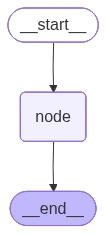
- node가 연결되는 상태기반 그래프를 만들어준다.
- set_entry_point를 통해 시작지점을 간단하게 만들어 줄 수 있다.
상태기반 그래프를 통한 결과출력
from langchain_core.messages import HumanMessage

result = graph.invoke({"messages": [HumanMessage("안녕하세요!")]})
result

# {'messages': [HumanMessage(content='안녕하세요!', additional_kwargs={}, response_metadata={}),
#   AIMessage(content='안녕하세요! 무엇을 도와드릴까요?', additional_kwargs={}, response_metadata={}, tool_calls=[], invalid_tool_calls=[])],
# 'extra_field': 10}- 위를 통해 안녕하세요! 라는 메세지가 그래프에 들어가면
- 이전에 미리 넣어둔 안녕하세요! 무엇을 도와드릴까요? 라는 문장이 AIMessage를 통해 출력됨을 확인할 수 있다.
- 기존 메세지, 새로운 메세지, 속성등
실제로 적용하면 해당 메세지를 넣어주고, 실제 AI모듈을 연결해줄 수 있다.
대화 메세지 상태 누적 업데이트(리듀서를 통한 연결)
from typing_extensions import Annotated
from langgraph.graph.message import add_messages

class State(TypedDict):
		messages: Annotated[list[AnyMessage], add_messages]
		extra_field: int

def node(state: State):
    messages = state["messages"]  -
    new_message = AIMessage("안녕하세요! 무엇을 도와드릴까요?")

    return {"messages": new_message, "extra_field": state["extra_field"] + 1}

def routing_function(state:State):
    if state["extra_field"] < 3:
        return True
return False- 이전과 비슷하게 상태함수와 노드를 만들었다.
- 차이는 messages에 Annotated를 통해 리듀서함수를 연결해 주었다는 점이다.
- 또한, 비교를 위해 노드를 여러번 통과시키도록 ndoe함수를 수정해 extra_field를 통해 횟수를 업데이트 하도록 만들어주었다.
- 조건부 함수가 아닌 그냥 연결할 경우 무한 반복하므로 조건부 엣지로 연결해준다.
from langgraph.graph import StateGraph, START, END

graph_builder = StateGraph(State)

graph_builder.add_node("node", node)
graph_builder.add_edge(START, "node")
graph_builder.add_conditional_edges("node", routing_function, {True: "node", False: END})
graph_builder.add_edge("node", END)
graph = graph_builder.compile()

graph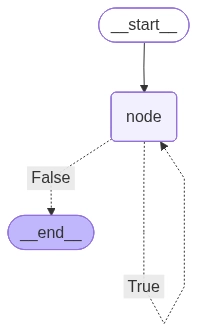
- 그래프는 위와 같이 생성된다.
input_message = {"role": "user", "content": "안녕하세요!"} # 안녕하세요 라고 user가 말함.
# invoke 그래프 실행함수.
result = graph.invoke({"messages": [input_message], "extra_field": 0})

result

# for message in result["messages"]:
# # pretty_print()는 데이터나 객체를 보기 좋게(Pretty) 정리해서 출력하는 함수
#     message.pretty_print()
input_message = {"role": "user", "content": "안녕하세요!"} # 안녕하세요 라고 user가 말함.
# invoke 그래프 실행함수.
result = graph.invoke({"messages": [input_message], "extra_field": 0})
result
for message in result["messages"]:
# pretty_print()는 데이터나 객체를 보기 좋게(Pretty) 정리해서 출력하는 함수
message.pretty_print()
================================ Human Message =================================

안녕하세요!
================================== Ai Message ==================================

안녕하세요! 무엇을 도와드릴까요?
================================== Ai Message ==================================
안녕하세요! 무엇을 도와드릴까요?
================================== Ai Message ==================================
안녕하세요! 무엇을 도와드릴까요?3번 중첩되어 쌓인 채로 출력되는 것을 확인할 수 있다.
만약 리듀서가 없이 위의 상태함수일 경우 매번 초기화 되어 한번 출력된다.
================================ Human Message =================================
안녕하세요!
================================== Ai Message ==================================
안녕하세요! 무엇을 도와드릴까요?invoke(동기 처리) vs ainvoke(비동기 처리) vs stream(실시간 반환)
invoke: 요청에 대한 결과를 처리할 때 까지 코드 실행을 멈춘다.
- graph.invoke({”messages”: [input_message]})
ainvoke: 여러 요청을 병렬적으로 보낼 수 있다.
- await graph.ainvoke({"messages":[input_message]})
stream: 중간 결과를 실시간으로 반환.(단계별로)
- stream_mode = “values”: 각 단계의 현재 상태 값 출력
{'messages': [HumanMessage(content='안녕하세요!', additional_kwargs={}, response_metadata={}, id='b8a54fa4-44d7-4c47-9346-b1d5468d8dd1')], 'extra_field': 0} {'messages': [HumanMessage(content='안녕하세요!', additional_kwargs={}, response_metadata={}, id='b8a54fa4-44d7-4c47-9346-b1d5468d8dd1'), AIMessage(content='안녕하세요! 무엇을 도와드릴까요?', additional_kwargs={}, response_metadata={}, id='15efe3cf-230f-43d5-95d5-9772c68c4f54', tool_calls=[], invalid_tool_calls=[])], 'extra_field': 1} {'messages': [HumanMessage(content='안녕하세요!', additional_kwargs={}, response_metadata={}, id='b8a54fa4-44d7-4c47-9346-b1d5468d8dd1'), AIMessage(content='안녕하세요! 무엇을 도와드릴까요?', additional_kwargs={}, response_metadata={}, id='15efe3cf-230f-43d5-95d5-9772c68c4f54', tool_calls=[], invalid_tool_calls=[]), AIMessage(content='안녕하세요! 무엇을 도와드릴까요?', additional_kwargs={}, response_metadata={}, id='2686d38e-d90b-4b92-92a8-4bbbc1ed685d', tool_calls=[], invalid_tool_calls=[])], 'extra_field': 2}- 점점 출력값이 쌓인다.
- # values for chunk in graph.stream({"messages": [input_message], "extra_field" : 0}, stream_mode="values"): print(chunk)
- *stream_mode = “updates”: 각 단계의 상태 업데이트만 출력(default)
{'node': {'messages': AIMessage(content='안녕하세요! 무엇을 도와드릴까요?', additional_kwargs={}, response_metadata={}, id='c78cf4ca-4135-47ed-9014-9d536a1689eb', tool_calls=[], invalid_tool_calls=[]), 'extra_field': 1}} {'node': {'messages': AIMessage(content='안녕하세요! 무엇을 도와드릴까요?', additional_kwargs={}, response_metadata={}, id='451b2182-882f-4ae5-a007-cd886f218184', tool_calls=[], invalid_tool_calls=[]), 'extra_field': 2}} {'node': {'messages': AIMessage(content='안녕하세요! 무엇을 도와드릴까요?', additional_kwargs={}, response_metadata={}, id='0eea7651-a56f-49d9-9695-1329ebc538a0', tool_calls=[], invalid_tool_calls=[]), 'extra_field': 3}}- 업데이트된 값만 보여준다.
- for chunk in graph.stream({"messages": [input_message], "extra_field" : 0}, stream_mode="updates"): print(chunk)
- stream_mode = “messages”: 각 단계의 메세지 출력
(AIMessage(content='안녕하세요! 무엇을 도와드릴까요?', additional_kwargs={}, response_metadata={}, id='51d47151-a253-4995-952c-b73ac923004d', tool_calls=[], invalid_tool_calls=[]), {'langgraph_step': 1, 'langgraph_node': 'node', 'langgraph_triggers': ('branch:to:node',), 'langgraph_path': ('__pregel_pull', 'node'), 'langgraph_checkpoint_ns': 'node:504d0be9-88de-b271-131c-3c5ab12532da'}) (AIMessage(content='안녕하세요! 무엇을 도와드릴까요?', additional_kwargs={}, response_metadata={}, id='459960de-7d71-4aaf-9c9c-f58e800a0e6c', tool_calls=[], invalid_tool_calls=[]), {'langgraph_step': 2, 'langgraph_node': 'node', 'langgraph_triggers': ('branch:to:node',), 'langgraph_path': ('__pregel_pull', 'node'), 'langgraph_checkpoint_ns': 'node:5d231a0a-cbd6-196f-5387-bf523e29d4a6'}) (AIMessage(content='안녕하세요! 무엇을 도와드릴까요?', additional_kwargs={}, response_metadata={}, id='64da4797-a8be-425b-b719-4aba100d7a76', tool_calls=[], invalid_tool_calls=[]), {'langgraph_step': 3, 'langgraph_node': 'node', 'langgraph_triggers': ('branch:to:node',), 'langgraph_path': ('__pregel_pull', 'node'), 'langgraph_checkpoint_ns': 'node:539181ee-ac33-b540-d920-844e7565548a'})- 업데이트된 새로운 메세지만 출력해서 보여준다.
- for chunk in graph.stream({"messages": [input_message], "extra_field" : 0}, stream_mode="messages"): print(chunk)
그래프 병렬 연결
import operator
from typing import Annotated, Any
from typing_extensions import TypedDict
from langgraph_graph import StateGraph, START, END

class State(TypedDict):
aggregate:Annotated[list, operator.add]- 상태의 정의를 Annotated를 이용해 새로운 값을 리스트에 추가로 저장하는 형태로 설정
def a(state:State):
		print(f'Adding "A" to {state["aggregate"]}')
		return {"aggregate": ["A"]}

def b(state: State):
    print(f'Adding "B" to {state["aggregate"]}')
    return {"aggregate": ["B"]}

def c(state: State):
    print(f'Adding "C" to {state["aggregate"]}')
    return {"aggregate": ["C"]}

def d(state: State):
    print(f'Adding "D" to {state["aggregate"]}')
return {"aggregate": ["D"]}- a,b,c,d를 추가해주는 함수를 각각 생성했다.
graph_builder = StateGraph(State)

graph_builder.add_node(a)
graph_builder.add_node(b)
graph_builder.add_node(c)
graph_builder.add_node(d)

graph_builder.add_edge(START, 'a')
graph_builder.add_edge('a', 'b')
graph_builder.add_edge('a', 'c')
graph_builder.add_edge('b', 'd')
graph_builder.add_edge('c', 'd')
graph_builder.add_edge('d', END)

graph = graph_builder.compile()
graph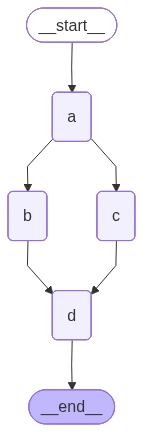
- 그래프를 위와 같이 구현해 보았다.
graph.invoke({"aggregate":[]})

# Adding "A" to []
# Adding "B" to ['A']
# Adding "C" to ['A']
# Adding "D" to ['A', 'B', 'C']

# {'aggregate': ['A', 'B', 'C', 'D']}- 위와 같이 하나의 값을 넣으면 한쪽의 값이 출력되는 것이 아닌 B와C를 병렬로 처리해 모든 값이 한번에 출력되는 것을 확인할 수 있다.
조건부 엣지 병렬연결
import operator
from typing import Annotated, Sequence
from typing_extensions import TypedDict
from langgraph.graph import StateGraph, START, END

class State(TypedDict):
		aggregate: Annotated[list, operator.add]
		which: str
def a(state: State):
print(f'Adding "A" to {state["aggregate"]}')
return {"aggregate": ["A"]}
def b(state: State):
print(f'Adding "B" to {state["aggregate"]}')
return {"aggregate": ["B"]}
def c(state: State):
print(f'Adding "C" to {state["aggregate"]}')
return {"aggregate": ["C"]}
def d(state: State):
print(f'Adding "D" to {state["aggregate"]}')
return {"aggregate": ["D"]}
def e(state: State):
print(f'Adding "E" to {state["aggregate"]}')
return {"aggregate": ["E"]}graph_builder = StateGraph(State)
graph_builder.add_node(a)
graph_builder.add_node(b)
graph_builder.add_node(c)
graph_builder.add_node(d)
graph_builder.add_node(e)
graph_builder.add_edge(START, "a")- 위부분은 이전과 비슷하게 설정
- 하나 which 상태를 추가해 어디로 향할지 조건부를 설정할 수 있도록 변경
def route_bc_or_cd(state:State) -> Sequence[str]:
		if state["which"] == "cd":
				return ["c", "d"]
		return ["b","c"]

		intermediates = ["b","c","d"]

graph_builder.add_conditional_edges(
		"a",
		route_bc_or_cd,
		intermediates
)- which가 cd일 경우 c와 d를 통과, bc일경우 b와 c를 통과하도록 라우팅함수를 설정
- intermediates를 통해 한번에 3개의 노드를 병렬 연결
for node in intermediates:
		graph_builder.add_edge(node, "e")

graph_builder.add_edge("e", END)
graph = graph_builder.compile()
graph- 반복문으로 그래프를 연결해줄 수 있다.
- 그래프의 완성은 위와 같다.
초기값이 bc일경우
graph.invoke({"aggregate": [], "which": "bc"})

# Adding "A" to []
# Adding "B" to ['A']
# Adding "C" to ['A']
# Adding "E" to ['A', 'B', 'C']
# {'aggregate': ['A', 'B', 'C', 'E'], 'which': 'bc'}- b와 c를 병렬로 통과해 위와 같은 결과가,
초기값이 cd일경우
graph.invoke({"aggregate": [], "which": "cd"})

# Adding "A" to []
# Adding "C" to ['A']
# Adding "D" to ['A']
# Adding "E" to ['A', 'C', 'D']
# {'aggregate': ['A', 'C', 'D', 'E'], 'which': 'cd'}- c와 d를 병렬로 통과해 위와 같은 결과가 출력된다.
조건과 반복
import operator
from typing import Annotated
from typing_extensions import TypedDict
from langgraph.graph import StateGraph, START, END

class State(TypedDict):
		aggregate: Annotated[list, operator.add]

def a(state: State):
    print(f'Node A 처리 중 현재 상태값 : {state["aggregate"]}')
    return {"aggregate": ["A"]}

def b(state: State):
    print(f'Node B 처리 중 현재 상태값 : {state["aggregate"]}')
    return {"aggregate": ["B"]}

graph_builder = StateGraph(State)
graph_builder.add_node(a)
graph_builder.add_node(b)- 두 개의 노드를 만들어주었다.
이건 이전에 했던 방식과 같은데
def route(state: State):
    if len(state["aggregate"]) < 7:
        return "b"
    else:
        return END

graph_builder.add_edge(START, "a")
graph_builder.add_conditional_edges("a", route)
graph_builder.add_edge("b", "a")
graph = graph_builder.compile()

graph- 위와 같은 방식으로 7이 될때까지 반복한다면면
graph.invoke({"aggregate": []})

# Node A 처리 중 현재 상태값 : []
# Node B 처리 중 현재 상태값 : ['A']
# Node A 처리 중 현재 상태값 : ['A', 'B']
# Node B 처리 중 현재 상태값 : ['A', 'B', 'A']
# Node A 처리 중 현재 상태값 : ['A', 'B', 'A', 'B']
# Node B 처리 중 현재 상태값 : ['A', 'B', 'A', 'B', 'A']
# Node A 처리 중 현재 상태값 : ['A', 'B', 'A', 'B', 'A', 'B']

# {'aggregate': ['A', 'B', 'A', 'B', 'A', 'B', 'A']}- 위와 같이 상태값이 중첩되며 7번 출력되면 정지됨을 확인할 수 있다.
from langgraph.errors import GraphRecursionError
# GraphRecursionError 로 에러를 반환하는 방법
try:
    graph.invoke({"aggregate": []}, config={"recursion_limit": 4})
except GraphRecursionError: # 반복 종료 조건에 도달할 수 없는 경우
    print("Recursion Error")

# Node A 처리 중 현재 상태값 : []
# Node B 처리 중 현재 상태값 : ['A']
# Node A 처리 중 현재 상태값 : ['A', 'B']
# Node B 처리 중 현재 상태값 : ['A', 'B', 'A']
# Recursion Error- 만약 반복을 했는데 종료 조건에 도달하지 못할 경우 recursion_limit을 설정해 중단되도록 할 수 있다.
조건 + 반복 + 병렬처리
import operator
from typing import Annotated, Literal
from typing_extensions import TypedDict
from langgraph.graph import StateGraph, START, END

class State(TypedDict):
    aggregate: Annotated[list, operator.add]
def a(state: State):
print(f'Node A 처리 중 현재 상태값 : {state["aggregate"]}')
return {"aggregate": ["A"]}
def b(state: State):
print(f'Node B 처리 중 현재 상태값 : {state["aggregate"]}')
return {"aggregate": ["B"]}
def c(state: State):
print(f'Node C 처리 중 현재 상태값 : {state["aggregate"]}')
return {"aggregate": ["C"]}
def d(state: State):
print(f'Node D 처리 중 현재 상태값 : {state["aggregate"]}')
return {"aggregate": ["D"]}
graph_builder = StateGraph(State)
graph_builder.add_node(a)
graph_builder.add_node(b)
graph_builder.add_node(c)
graph_builder.add_node(d)def route(state: State) -> Literal['b', END]:
# ["A", "B", "C"] -> 3
if len(state['aggregate']) < 7: # 딱히 의미는 없음 그래프대로 나눠주기 위함
return "b"
else:
return END
graph_builder.add_edge(START, "a") # START -> a
graph_builder.add_conditional_edges("a", route) # a -> b 혹은 a -> END
graph_builder.add_edge("b", "c") # b -> c
graph_builder.add_edge("b", "d") # b -> d
graph_builder.add_edge(["c", "d"], "a") # c -> a, d -> a
graph = graph_builder.compile()
result = graph.invoke({"aggregate": []})

# Node A 처리 중 현재 상태값 : []
# Node B 처리 중 현재 상태값 : ['A']
# Node C 처리 중 현재 상태값 : ['A', 'B']
# Node D 처리 중 현재 상태값 : ['A', 'B']
# Node A 처리 중 현재 상태값 : ['A', 'B', 'C', 'D']
# Node B 처리 중 현재 상태값 : ['A', 'B', 'C', 'D', 'A']
# Node C 처리 중 현재 상태값 : ['A', 'B', 'C', 'D', 'A', 'B']
# Node D 처리 중 현재 상태값 : ['A', 'B', 'C', 'D', 'A', 'B']
# Node A 처리 중 현재 상태값 : ['A', 'B', 'C', 'D', 'A', 'B', 'C', 'D']- 전체적으로 이전의 내용과 비슷하지만, 모든걸 섞어서 복잡하게 만들어 보았다.
입력에 따른 반복
from typing import Annotated
from typing_extentions import TypedDict
from langgraph.graph import StateGraph, START, END
from langchain_core.messages import AIMessage, HumanMessage
from langgraph.graph.message import add_messages

class State(TypedDict):
		human_messages = Annotated[list[HumanMessage], add_messages]
		ai_messages = Annotated[list[AIMessage], add_messages]
		retry_num: int

def chatbot(state:State):
		retry_num = state["retry_num"]
		user_input = input(f'현재 {retry_num}회 재시도 중 입니다. 사용자 입력: ')
		ai_message = AIMessage(f'{retry_num}번째 답변')
return {"human_messages": [HumanMessage(user_input)], "ai_messages":[AIMessage(ai_message)], "retry_num": retry_num}- chatbot노드에선 human message와 aimessage를 업데이트 해주는 역할
- input을 통해 사용자의 입력을 받음.
def retry(state:State):
return {"retry_num": state["retry_num"] + 1}- retry노드에선 retry횟수를 증가시켜주는 노드
graph_builder = StateGraph(State)
graph_builder.add_node(chatbot)
graph_builder.add_node(retry)- 상태그래프와 노드 정의후
def route(state:State):
		if "반복" in state["human_message"][-1].content:
				return "retry"
		else:
return END- 반복이라는 챗이 들어오면 다시 retry노드로 넘어가도록 설정
graph_builder.add_edge(START, "chatbot")
graph_builder.add_conditional_edges("chatbot", route)
graph_builder.add_edge("retry", "chatbot")
graph = graph_builder.compile()

graph
for chunk in graph.stream({"human_messages": "반복", "retry_num": 0}, stream_mode="updates"):
print(chunk)
for node, value in chunk.items():
if node:
print(node)
if "messages" in value:
print(value['messages'].content)- stream을 통해 반복함수를 돌려 실제로 어떻게 출력되나 살펴보면.
for chunk in graph.stream({"human_messages": "반복", "retry_num": 0}, stream_mode="updates"):
    print(chunk)
    for node, value in chunk.items():
        if node:
            print(node)
        if "messages" in value:
            print(value['messages'].content)
# {'chatbot': {'human_messages': [HumanMessage(content='반복', additional_kwargs={}, response_metadata={}, id='2872f6a7-e4d3-49de-8a66-5b4f0ae4a7ea')], 'ai_messages': [AIMessage(content='0번째 답변 중', additional_kwargs={}, response_metadata={}, id='30981dec-9b62-4484-8756-41e341c2a28a', tool_calls=[], invalid_tool_calls=[])], 'retry_num': 0}}
# chatbot
# {'retry': {'retry_num': 1}}
# retry
# {'chatbot': {'human_messages': [HumanMessage(content='반복', additional_kwargs={}, response_metadata={}, id='e86f9294-2a89-49a7-93df-66d023f46d3b')], 'ai_messages': [AIMessage(content='1번째 답변 중', additional_kwargs={}, response_metadata={}, id='53726191-4a1d-4454-9351-cc14b3f60279', tool_calls=[], invalid_tool_calls=[])], 'retry_num': 1}}
# chatbot
# {'retry': {'retry_num': 2}}
# retry
# {'chatbot': {'human_messages': [HumanMessage(content='끝', additional_kwargs={}, response_metadata={}, id='71b7b3ec-d322-49d0-89d7-4542a126c72d')], 'ai_messages': [AIMessage(content='2번째 답변 중', additional_kwargs={}, response_metadata={}, id='2f6fabd3-288d-4a9f-aaa1-37ee3f20f459', tool_calls=[], invalid_tool_calls=[])], 'retry_num': 2}}
# chatbot- 반복이라 입력하면 반복, 다른 키워드를 입력하면 끝나는 코드가 완성된다.
'AI공부 > AI Agent' 카테고리의 다른 글
| 6. 랭그래프를 이용한 챗봇 구성 (0) | 2026.04.05 |
|---|---|
| 5. 랭그래프에서 LLM으로 ToolCall하기 (0) | 2026.04.03 |
| 3. 랭그래프의 구성요소, 기능 구현 (0) | 2026.03.27 |
| 2. LangGraph, LangChain의 구분 (0) | 2026.03.26 |
| 1. AI Agent (0) | 2026.03.25 |